Saturday, May 19, 2012

Simplifying nested loops

I've recently been working my way through two Udacity courses, CS212, Design of Computer Programs, taught by Peter Norvig, and CS262, Programming Languages, taught by Westley Weimar and have become in interested in Functional Programming. So far, haven't found much reference material on the approach but I did come across some Charming Python articles that are very useful.

This is a re-work of one example from the first article, found under Eliminating Side-effects
# Examples of using functional programming in place of loops/control statements
# Reference: http://gnosis.cx/publish/programming/charming_python_13.html

# A larger example of converting IMPERATIVE program to FP
# Goal:
#   list pairs of numbers whose products are > 25
#
# Standard imperative approach, the 'more stuff' lines
# represent spots where other processing might occur in
# a full program and represent spots where the key variables
# may take on different values; as well, when this section
# of code is complete, all the variables may have values
# that may or not be expected, or wanted, in the remaining code

xs = (1,2,3,4)          # list of numbers
ys = (10, 15, 3, 22)    # second list of numbers
bigmuls = []            # list to hold results
# ... more stuff ....
for x in xs:
    for y in ys:
        # ... more stuff ....
        if x * y > 25:
            bigmuls.append( (x,y) )

print('Imperative Programming result:', bigmuls)            
            
# the same using an FP approach
#    bigmuls = lambda xs,ys: filter(lambda (x,y):x*y > 25, combine(xs,ys))
#    combine = lambda xs,ys: map(None, xs*len(ys), dupelms(ys,len(xs)))
#    dupelms = lambda lst,n: reduce(lambda s,t:s+t, map(lambda l,n=n: [l]*n, lst))
#
# Note:
#    the methods given in the article can be reduced to one line
#    by using itertools.product() which produces 'all pairs' from two given lists
#    essentially, this was the purpose of the 'dupelms() and 'combine()' functions
#    in the original article. 
#    A key advantage of this approach:
#        the original variable value NEVER change, so no possible side-effects


from itertools import product

bigmuls = lambda xs,ys: filter(lambda pair: pair[0]*pair[1] > 25, product(xs,ys) )

print('Functional Programming result:', list(bigmuls(xs,ys)))

# Or an even better example, just use a 'list comprehension' as a one-off need

res = [a for a in product(xs,ys) if a[0]*a[1] > 25]
print('List Comprehension result    :', res)

Wednesday, May 9, 2012

Convert list of lists to single list

This example is based on a Udacity CS262 discussion forum post.

  messedUp = [['one'], ['two'],['three'], ['four']]
  return [item for inner in messedUp for item in inner]
  
  Result:   ['one', 'two', 'three', 'four']

Monday, April 30, 2012

Find unique characters in a string

An example of finding unique characters in a string using set and re

testStr = 'AAA 7 BBBB C 1 DDD d Y ZZ 3'
''.join( set(re.findall(r'[a-zA-Z]',testStr)) )
Output:
'ACBDYZd'


Wednesday, February 1, 2012

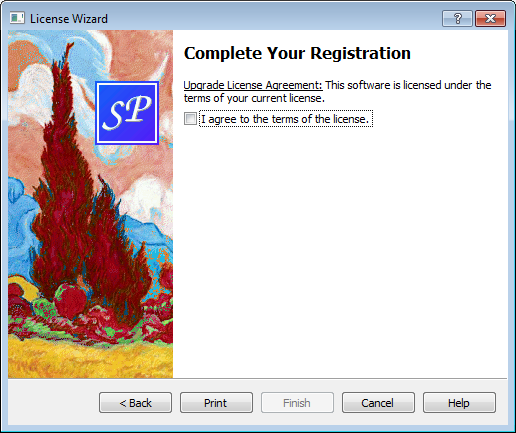
Qt License Wizard Example

The following is based on the Qt License Wizard Example which creates a complex (non-linear) wizard.

Modified the original example to position the Print button between the Back and Finish buttons rather than the default layout which would place it to the right of the Back button.


#!/usr/bin/env python3
# -*- coding: utf-8 -*-

'''
    PyQt4 conversion of Qt License Wizard Example
    
    A complex Wizard example where the path through the wizard depends
    on user choices.
    
    NOTES:
    =====
    
    Field Validation
    ----------------
    Fields are only validated if they are registered as mandatory
    (denoted by an asterisk after the name) even if they have
    been assigned a QRegExValidator.
    
    i.e. 
        registerField("evaluate.email*", emailEdit) - validates
        registerField("evaluate.email", emailEdit) - no validation
    
    Button Positioning
    ------------------
    If you want to change the order in which the buttons appear
    you can set their layout; however, the layout ignores the visibility 
    of the custom buttons so need to remove them from the layout to hide them.
    (see ConclusionPage._configWizBtns()) 

    Refactored
    ----------
    Refactored _showHelp() - extracted messages to _createHelpMsgs(),
    solely as an exercise in using Python dictionaries.

last modified: 2012-01-25 jg
ref:
    http://developer.qt.nokia.com/doc/qt-4.8/dialogs-licensewizard.html
'''
from PyQt4.QtGui import (QApplication, QWizard, QWizardPage, QPixmap, QLabel,
                         QRadioButton, QVBoxLayout, QLineEdit, QGridLayout,
                         QRegExpValidator, QCheckBox, QPrinter, QPrintDialog,
                         QMessageBox)
from PyQt4.QtCore import (pyqtSlot, QRegExp)
import qrc_licwiz

class LicenseWizard(QWizard):
    NUM_PAGES = 5

    (PageIntro, PageEvaluate, PageRegister, PageDetails,
        PageConclusion) = range(NUM_PAGES)

    def __init__(self, parent=None):
        super(LicenseWizard, self).__init__(parent)

        self.setPage(self.PageIntro, IntroPage(self))
        self.setPage(self.PageEvaluate, EvaluatePage())
        self.setPage(self.PageRegister, RegisterPage())
        self.setPage(self.PageDetails, DetailsPage())
        self.setPage(self.PageConclusion, ConclusionPage())

        self.setStartId(self.PageIntro)

        # images won't show in Windows 7 if style not set
        self.setWizardStyle(self.ModernStyle)
        self.setOption(self.HaveHelpButton, True)
        self.setPixmap(QWizard.LogoPixmap, QPixmap(":/images/logo.png"))

        # set up help messages
        self._lastHelpMsg = ''
        self._helpMsgs = self._createHelpMsgs()
        self.helpRequested.connect(self._showHelp)

        self.setWindowTitle(self.tr("License Wizard"))

    def _createHelpMsgs(self):
        msgs = {}
        msgs[self.PageIntro] = self.tr(
            "The decision you make here will affect which page you "
            "get to see next.")
        msgs[self.PageEvaluate] = self.tr(
            "Make sure to provide a valid email address, such as "
            "toni.buddenbrook@example.de.")
        msgs[self.PageRegister] = self.tr(
            "If you don't provide an upgrade key, you will be "
            "asked to fill in your details.")
        msgs[self.PageDetails] = self.tr(
            "Make sure to provide a valid email address, such as "
            "thomas.gradgrind@example.co.uk.")
        msgs[self.PageConclusion] = self.tr(
            "You must accept the terms and conditions of the "
            "license to proceed.")
        msgs[self.NUM_PAGES + 1] = self.tr("Sorry, I already gave what help I could. "
                          "\nMaybe you should try asking a human?")
        return msgs

    @pyqtSlot()
    def _showHelp(self):
        # get the help message for the current page
        msg = self._helpMsgs[self.currentId()]

        # if same as last message, display alternate message
        if msg == self._lastHelpMsg:
            msg = self._helpMsgs[self.NUM_PAGES + 1]

        QMessageBox.information(self,
                                self.tr("License Wizard Help"),
                                msg)
        self._lastHelpMsg = msg

class IntroPage(QWizardPage):
    def __init__(self, parent=None):
        super(IntroPage, self).__init__(parent)

        self.setTitle(self.tr("Introduction"))
        self.setPixmap(QWizard.WatermarkPixmap, QPixmap(":/images/watermark.png"))
        topLabel = QLabel(self.tr("This Wizard will help you register your copy of "
                                  "Super Product One™ or start "
                                  "evaluating the product."))
        topLabel.setWordWrap(True)

        regRBtn = QRadioButton(self.tr("&Register your copy"))
        self.evalRBtn = QRadioButton(self.tr("&Evaluate the product for 30 days"))
        regRBtn.setChecked(True)

        layout = QVBoxLayout()
        layout.addWidget(topLabel)
        layout.addWidget(regRBtn)
        layout.addWidget(self.evalRBtn)
        self.setLayout(layout)

    def nextId(self):
        if self.evalRBtn.isChecked():
            return LicenseWizard.PageEvaluate
        else:
            return LicenseWizard.PageRegister

class EvaluatePage(QWizardPage):
    def __init__(self, parent=None):
        super(EvaluatePage, self).__init__(parent)

        self.setTitle(self.tr("Evaluate Super Product One™"))
        self.setSubTitle(self.tr("Please fill both fields. \nMake sure to provide "
                                 "a valid email address (e.g. john.smith@example.com)"))
        nameLabel = QLabel("Name: ")
        nameEdit = QLineEdit()
        nameLabel.setBuddy(nameEdit)

        emailLabel = QLabel(self.tr("&Email address: "))
        emailEdit = QLineEdit()
        emailEdit.setValidator(QRegExpValidator(
                QRegExp(".*@.*"), self))
        emailLabel.setBuddy(emailEdit)

        self.registerField("evaluate.name*", nameEdit)
        self.registerField("evaluate.email*", emailEdit)

        grid = QGridLayout()
        grid.addWidget(nameLabel, 0, 0)
        grid.addWidget(nameEdit, 0, 1)
        grid.addWidget(emailLabel, 1, 0)
        grid.addWidget(emailEdit, 1, 1)
        self.setLayout(grid)

    def nextId(self):
        return LicenseWizard.PageConclusion

class RegisterPage(QWizardPage):
    def __init__(self, parent=None):
        super(RegisterPage, self).__init__(parent)

        self.setTitle(self.tr("Register Your Copy of Super Product One™"))
        self.setSubTitle(self.tr("If you have an upgrade key, please fill in "
                                 "the appropriate field."))
        nameLabel = QLabel(self.tr("N&ame"))
        nameEdit = QLineEdit()
        nameLabel.setBuddy(nameEdit)

        upgradeKeyLabel = QLabel(self.tr("&Upgrade key"))
        self.upgradeKeyEdit = QLineEdit()
        upgradeKeyLabel.setBuddy(self.upgradeKeyEdit)

        self.registerField("register.name*", nameEdit)
        self.registerField("register.upgradeKey", self.upgradeKeyEdit)

        grid = QGridLayout()
        grid.addWidget(nameLabel, 0, 0)
        grid.addWidget(nameEdit, 0, 1)
        grid.addWidget(upgradeKeyLabel, 1, 0)
        grid.addWidget(self.upgradeKeyEdit, 1, 1)

        self.setLayout(grid)

    def nextId(self):
        if len(self.upgradeKeyEdit.text()) > 0 :
            return LicenseWizard.PageConclusion
        else:
            return LicenseWizard.PageDetails


class DetailsPage(QWizardPage):
    def __init__(self, parent=None):
        super(DetailsPage, self).__init__(parent)

        self.setTitle(self.tr("Fill in Your Details"))
        self.setSubTitle(self.tr("Please fill all three fields. /n"
                                 "Make sure to provide a valid "
                                 "email address (e.g., tanaka.aya@example.com)."))
        coLabel = QLabel(self.tr("&Company name: "))
        coEdit = QLineEdit()
        coLabel.setBuddy(coEdit)

        emailLabel = QLabel(self.tr("&Email address: "))
        emailEdit = QLineEdit()
        emailEdit.setValidator(QRegExpValidator(QRegExp(".*@.*"), self))
        emailLabel.setBuddy(emailEdit)

        postLabel = QLabel(self.tr("&Postal address: "))
        postEdit = QLineEdit()
        postLabel.setBuddy(postEdit)

        self.registerField("details.company*", coEdit)
        self.registerField("details.email*", emailEdit)
        self.registerField("details.postal*", postEdit)

        grid = QGridLayout()
        grid.addWidget(coLabel, 0, 0)
        grid.addWidget(coEdit, 0, 1)
        grid.addWidget(emailLabel, 1, 0)
        grid.addWidget(emailEdit, 1, 1)
        grid.addWidget(postLabel, 2, 0)
        grid.addWidget(postEdit, 2, 1)
        self.setLayout(grid)

    def nextId(self):
        return LicenseWizard.PageConclusion

class ConclusionPage(QWizardPage):
    def __init__(self, parent=None):
        super(ConclusionPage, self).__init__(parent)

        self.setTitle(self.tr("Complete Your Registration"))
        self.setPixmap(QWizard.WatermarkPixmap, QPixmap(":/images/watermark.png"))

        self.bottomLabel = QLabel()
        self.bottomLabel.setWordWrap(True)

        agreeBox = QCheckBox(self.tr("I agree to the terms of the license."))

        self.registerField("conclusion.agree*", agreeBox)

        vbox = QVBoxLayout()
        vbox.addWidget(self.bottomLabel)
        vbox.addWidget(agreeBox)
        self.setLayout(vbox)

    def nextId(self):
        return -1

    def initializePage(self):
        licenseText = ''

        if self.wizard().hasVisitedPage(LicenseWizard.PageEvaluate):
            licenseText = self.tr("Evaluation License Agreement: "
                          "You can use this software for 30 days and make one "
                          "backup, but you are not allowed to distribute it.")
        elif self.wizard().hasVisitedPage(LicenseWizard.PageDetails):
            licenseText = self.tr("First-Time License Agreement: "
                          "You can use this software subject to the license "
                          "you will receive by email.")
        else:
            licenseText = self.tr("Upgrade License Agreement: "
                          "This software is licensed under the terms of your "
                          "current license.")

        self.bottomLabel.setText(licenseText)

    def setVisible(self, visible):
        # only show the 'Print' button on the last page
        QWizardPage.setVisible(self, visible)

        if visible:
            self.wizard().setButtonText(QWizard.CustomButton1, self.tr("&Print"))
            self.wizard().setOption(QWizard.HaveCustomButton1, True)
            self.wizard().customButtonClicked.connect(self._printButtonClicked)
            self._configWizBtns(True)
        else:
            # only disconnect if button has been assigned and connected
            btn = self.wizard().button(QWizard.CustomButton1)
            if len(btn.text()) > 0:
                self.wizard().customButtonClicked.disconnect(self._printButtonClicked)

            self.wizard().setOption(QWizard.HaveCustomButton1, False)
            self._configWizBtns(False)

    def _configWizBtns(self, state):
        # position the Print button (CustomButton1) before the Finish button
        if state:
            btnList = [QWizard.Stretch, QWizard.BackButton, QWizard.NextButton,
                       QWizard.CustomButton1, QWizard.FinishButton,
                       QWizard.CancelButton, QWizard.HelpButton]
            self.wizard().setButtonLayout(btnList)
        else:
            # remove it if it's not visible
            btnList = [QWizard.Stretch, QWizard.BackButton, QWizard.NextButton,
                       QWizard.FinishButton,
                       QWizard.CancelButton, QWizard.HelpButton]
            self.wizard().setButtonLayout(btnList)

    @pyqtSlot()
    def _printButtonClicked(self):
        printer = QPrinter()
        dialog = QPrintDialog(printer, self)
        if dialog.exec():
            QMessageBox.warning(self,
                                self.tr("Print License"),
                                self.tr("As an environment friendly measure, the "
                                        "license text will not actually be printed."))


# main ========================================================================
def main():
    import sys

    app = QApplication(sys.argv)
    wiz = LicenseWizard()
    wiz.show()

    sys.exit(app.exec_())

if __name__ == '__main__':
    main()

Tuesday, January 31, 2012

Qt 4.8 Basic Sort/Filter Model Example - Part 1

The following code is based on the Qt 4.8  Basic Sort/Filter Model Example; listed under Qt Item Views Examples. The original example has one class, Window, and is split over two files: main.cpp and window.cpp with associated header files. Here they've been combined in one module file built up in three stages.

The example demonstrates the use of QSortProxyModel, QStandardItemModel and QTreeView. One standard item model is used to create two views containing the same data. The second view uses a proxy model to allow sorting and filtering. Changes in the second view are not reflected in the first view even though the underlying models are the same.

Part 1 creates the basic GUI.


#!/usr/bin/env python3
# -*- coding: utf-8 -*-

'''
    PyQt4 conversion of Qt Basic Sort/Filter Example
    
        The Basic Sort/Filter Model example illustrates how to use 
        QSortFilterProxyModel to perform basic sorting and filtering.
          
    BEHAVIOUR:
    =========
    GUI is laid out. The initial conditions for each widget
    are in place. Both the case sentivity checkboxes are checked.
    The Filter Column combobox is set to 'Sender'.
    
    NOTES:
    =====
    Create Window class and implement methods to build the GUI
    (refactored the original C++ to split the creation of the
     various screen areas up for easier reading.)
     
    Create signal/slot connections, adding stub methods for the slots.
    
last modified: 2012-01-30 jg
ref:
    http://developer.qt.nokia.com/doc/qt-4.8/itemviews-basicsortfiltermodel.html
    
'''
from PyQt4.QtGui import (QApplication, QWidget, QGroupBox, QHBoxLayout, QLabel,
                         QVBoxLayout, QGridLayout, QTreeView, QSortFilterProxyModel,
                         QCheckBox, QLineEdit, QComboBox, QStandardItemModel)
from PyQt4.QtCore import (Qt, pyqtSlot, QRegExp)

class Window(QWidget):
    def __init__(self, parent=None):    # initialise base class
        super(Window, self).__init__(parent)

        layout = QVBoxLayout()
        layout.addWidget(self._createSourcePanel())
        layout.addWidget(self._createProxyPanel())
        self.setLayout(layout)

    # private methods ---------------------------------------------------------
    def _createSourcePanel(self):
        sourceGroupBox = QGroupBox(self.tr("Original Model"))
        sourceView = QTreeView()
        sourceView.setRootIsDecorated(False)
        sourceView.setAlternatingRowColors(True)

        sourceLayout = QHBoxLayout()
        sourceLayout.addWidget(sourceView)
        sourceGroupBox.setLayout(sourceLayout)

        return sourceGroupBox

    def _createProxyPanel(self):
        proxyGroupBox = QGroupBox(self.tr("Sorted/Filter Model"))
        proxyView = QTreeView()
        proxyView.setRootIsDecorated(False)
        proxyView.setAlternatingRowColors(True)
        proxyView.sortByColumn(1, Qt.AscendingOrder)

        proxyModel = QSortFilterProxyModel()
        proxyModel.setDynamicSortFilter(True)
        proxyView.setModel(proxyModel)
        proxyView.setSortingEnabled(True)   # click col hdr to sort

        proxyLayout = QVBoxLayout()
        proxyLayout.addWidget(proxyView)
        proxyLayout.addLayout(self._createProxyFilterPanel())
        proxyGroupBox.setLayout(proxyLayout)

        return proxyGroupBox

    def _createProxyFilterPanel(self):
        sortCaseSensitivityCheckBox = QCheckBox(self.tr("Case sensitive sorting"));
        sortCaseSensitivityCheckBox.setChecked(True)
        filterCaseSensitivityCheckBox = QCheckBox(self.tr("Case sensitive filter"));
        filterCaseSensitivityCheckBox.setChecked(True)

        filterPatternLineEdit = QLineEdit();
        filterPatternLabel = QLabel(self.tr("&Filter pattern:"));
        filterPatternLabel.setBuddy(filterPatternLineEdit);

        filterSyntaxComboBox = QComboBox();
        filterSyntaxComboBox.addItem(self.tr("Regular expression"), QRegExp.RegExp);
        filterSyntaxComboBox.addItem(self.tr("Wildcard"), QRegExp.Wildcard);
        filterSyntaxComboBox.addItem(self.tr("Fixed string"), QRegExp.FixedString);
        filterSyntaxLabel = QLabel(self.tr("Filter &syntax:"));
        filterSyntaxLabel.setBuddy(filterSyntaxComboBox);

        filterColumnComboBox = QComboBox();
        filterColumnComboBox.addItem(self.tr("Subject"));
        filterColumnComboBox.addItem(self.tr("Sender"));
        filterColumnComboBox.addItem(self.tr("Date"));
        filterColumnComboBox.setCurrentIndex(1)
        filterColumnLabel = QLabel(self.tr("Filter &column:"));
        filterColumnLabel.setBuddy(filterColumnComboBox);

        # connect signals/slots for event handling
        filterPatternLineEdit.textChanged.connect(self._filterRegExpChanged)
        filterSyntaxComboBox.currentIndexChanged.connect(self._filterRegExpChanged)
        filterColumnComboBox.currentIndexChanged.connect(self._filterColumnChanged)
        filterCaseSensitivityCheckBox.toggled.connect(self._filterRegExpChanged)
        sortCaseSensitivityCheckBox.toggled.connect(self._sortChanged)

        grid = QGridLayout()
        grid.addWidget(filterPatternLabel, 0, 0)
        grid.addWidget(filterPatternLineEdit, 0, 1)
        grid.addWidget(filterSyntaxLabel, 1, 0)
        grid.addWidget(filterSyntaxComboBox, 1, 1)
        grid.addWidget(filterColumnLabel, 2, 0)
        grid.addWidget(filterColumnComboBox, 2, 1)
        grid.addWidget(filterCaseSensitivityCheckBox, 3, 0)
        grid.addWidget(sortCaseSensitivityCheckBox, 3, 1, Qt.AlignRight)

        return grid

    # private slots -----------------------------------------------------------
    @pyqtSlot()
    def _filterRegExpChanged(self):
        pass

    @pyqtSlot()
    def _filterColumnChanged(self):
        pass

    @pyqtSlot()
    def _sortChanged(self):
        pass


# main ========================================================================
def main():
    import sys

    app = QApplication(sys.argv)
    mw = Window()
    mw.setWindowTitle("Basic Sort/Filter Model - Part 1")
    mw.resize(500, 450)
    mw.show()

    sys.exit(app.exec_())

if __name__ == '__main__':
    main()

Qt 4.8 Basic Sort/Filter Model Example - Part 2

In Part 2 the underlying model is created and populated with demo data. The proxy view is initially set to sort alphabetically on the Sender column.


#!/usr/bin/env python3
# -*- coding: utf-8 -*-

'''
    PyQt4 conversion of Qt Basic Sort/Filter Example
    
        The Basic Sort/Filter Model example illustrates how to use 
        QSortFilterProxyModel to perform basic sorting and filtering.
          
    BEHAVIOUR:
    =========
    Data has been added, with both panels using the same
    data model. 
    The data in the Sort/Filter panel is sorted by 'Sender'.
    Clicking the column headers re-sorts the data.
    
    NOTES:
    =====
    Changes to Window class:
        - added public method setSourceModel()
        - re-defined proxyView and sourceView as attributes
        
    Module:
        - added createMailModel()
        - added addMail()
        - modified main() to set the windows source model
    
    
last modified: 2012-01-30 jg
ref:
    http://developer.qt.nokia.com/doc/qt-4.8/itemviews-basicsortfiltermodel.html
    
'''
from PyQt4.QtGui import (QApplication, QWidget, QGroupBox, QHBoxLayout, QLabel,
                         QVBoxLayout, QGridLayout, QTreeView, QSortFilterProxyModel,
                         QCheckBox, QLineEdit, QComboBox, QStandardItemModel)
from PyQt4.QtCore import (Qt, pyqtSlot, QRegExp, QDateTime, QDate, QTime)

class Window(QWidget):
    def __init__(self, parent=None):    # initialise base class
        super(Window, self).__init__(parent)

        layout = QVBoxLayout()
        layout.addWidget(self._createSourcePanel())
        layout.addWidget(self._createProxyPanel())
        self.setLayout(layout)

    # public methods ----------------------------------------------------------
    def setSourceModel(self, model):
        self._proxyModel.setSourceModel(model)
        self._sourceView.setModel(model)

    # private methods ---------------------------------------------------------
    def _createSourcePanel(self):
        sourceGroupBox = QGroupBox(self.tr("Original Model"))
        self._sourceView = QTreeView()
        self._sourceView.setRootIsDecorated(False)
        self._sourceView.setAlternatingRowColors(True)

        sourceLayout = QHBoxLayout()
        sourceLayout.addWidget(self._sourceView)
        sourceGroupBox.setLayout(sourceLayout)

        return sourceGroupBox

    def _createProxyPanel(self):
        proxyGroupBox = QGroupBox(self.tr("Sorted/Filter Model"))
        proxyView = QTreeView()
        proxyView.setRootIsDecorated(False)
        proxyView.setAlternatingRowColors(True)
        proxyView.sortByColumn(1, Qt.AscendingOrder)

        self._proxyModel = QSortFilterProxyModel()
        self._proxyModel.setDynamicSortFilter(True)
        proxyView.setModel(self._proxyModel)
        proxyView.setSortingEnabled(True)   # click col hdr to sort

        proxyLayout = QVBoxLayout()
        proxyLayout.addWidget(proxyView)
        proxyLayout.addLayout(self._createProxyFilterPanel())
        proxyGroupBox.setLayout(proxyLayout)

        return proxyGroupBox

    def _createProxyFilterPanel(self):
        sortCaseSensitivityCheckBox = QCheckBox(self.tr("Case sensitive sorting"));
        sortCaseSensitivityCheckBox.setChecked(True)
        filterCaseSensitivityCheckBox = QCheckBox(self.tr("Case sensitive filter"));
        filterCaseSensitivityCheckBox.setChecked(True)

        filterPatternLineEdit = QLineEdit();
        filterPatternLabel = QLabel(self.tr("&Filter pattern:"));
        filterPatternLabel.setBuddy(filterPatternLineEdit);

        filterSyntaxComboBox = QComboBox();
        filterSyntaxComboBox.addItem(self.tr("Regular expression"), QRegExp.RegExp);
        filterSyntaxComboBox.addItem(self.tr("Wildcard"), QRegExp.Wildcard);
        filterSyntaxComboBox.addItem(self.tr("Fixed string"), QRegExp.FixedString);
        filterSyntaxLabel = QLabel(self.tr("Filter &syntax:"));
        filterSyntaxLabel.setBuddy(filterSyntaxComboBox);

        filterColumnComboBox = QComboBox();
        filterColumnComboBox.addItem(self.tr("Subject"));
        filterColumnComboBox.addItem(self.tr("Sender"));
        filterColumnComboBox.addItem(self.tr("Date"));
        filterColumnComboBox.setCurrentIndex(1)
        filterColumnLabel = QLabel(self.tr("Filter &column:"));
        filterColumnLabel.setBuddy(filterColumnComboBox);

        # connect signals/slots for event handling
        filterPatternLineEdit.textChanged.connect(self._filterRegExpChanged)
        filterSyntaxComboBox.currentIndexChanged.connect(self._filterRegExpChanged)
        filterColumnComboBox.currentIndexChanged.connect(self._filterColumnChanged)
        filterCaseSensitivityCheckBox.toggled.connect(self._filterRegExpChanged)
        sortCaseSensitivityCheckBox.toggled.connect(self._sortChanged)

        grid = QGridLayout()
        grid.addWidget(filterPatternLabel, 0, 0)
        grid.addWidget(filterPatternLineEdit, 0, 1)
        grid.addWidget(filterSyntaxLabel, 1, 0)
        grid.addWidget(filterSyntaxComboBox, 1, 1)
        grid.addWidget(filterColumnLabel, 2, 0)
        grid.addWidget(filterColumnComboBox, 2, 1)
        grid.addWidget(filterCaseSensitivityCheckBox, 3, 0)
        grid.addWidget(sortCaseSensitivityCheckBox, 3, 1, Qt.AlignRight)

        return grid

    # private slots -----------------------------------------------------------
    @pyqtSlot()
    def _filterRegExpChanged(self):
        pass

    @pyqtSlot()
    def _filterColumnChanged(self):
        pass

    @pyqtSlot()
    def _sortChanged(self):
        pass

# createMailModel() ==========================================================
def createMailModel(parent):
    # create, populate and return a 'QStandardItemModel' object
    model = QStandardItemModel(0, 3, parent)

    model.setHeaderData(0, Qt.Horizontal, parent.tr("Subject"))
    model.setHeaderData(1, Qt.Horizontal, parent.tr("Sender"))
    model.setHeaderData(2, Qt.Horizontal, parent.tr("Date"))

    addMail(model, "Happy New Year!", "Grace K. ",
            QDateTime(QDate(2006, 12, 31), QTime(17, 3)))
    addMail(model, "Radically new concept", "Grace K. ",
             QDateTime(QDate(2006, 12, 22), QTime(9, 44)))
    addMail(model, "Accounts", "pascale@nospam.com",
             QDateTime(QDate(2006, 12, 31), QTime(12, 50)))
    addMail(model, "Expenses", "Joe Bloggs ",
             QDateTime(QDate(2006, 12, 25), QTime(11, 39)))
    addMail(model, "Re: Expenses", "Andy ",
             QDateTime(QDate(2007, 1, 2), QTime(16, 5)))
    addMail(model, "Re: Accounts", "Joe Bloggs ",
             QDateTime(QDate(2007, 1, 3), QTime(14, 18)))
    addMail(model, "Re: Accounts", "Andy ",
             QDateTime(QDate(2007, 1, 3), QTime(14, 26)))
    addMail(model, "Sports", "Linda Smith ",
             QDateTime(QDate(2007, 1, 5), QTime(11, 33)))
    addMail(model, "AW: Sports", "Rolf Newschweinstein ",
             QDateTime(QDate(2007, 1, 5), QTime(12, 0)))
    addMail(model, "RE: Sports", "Petra Schmidt ",
             QDateTime(QDate(2007, 1, 5), QTime(12, 1)))

    return model

# addMail() ==================================================================
def addMail(model, subject, sender, date):
    # insert a row of data into the given model
    model.insertRow(0)
    model.setData(model.index(0, 0), subject)
    model.setData(model.index(0, 1), sender)
    model.setData(model.index(0, 2), date)

# main ========================================================================
def main():
    import sys

    app = QApplication(sys.argv)
    mw = Window()
    mw.setSourceModel(createMailModel(mw))
    mw.setWindowTitle("Basic Sort/Filter Model - Part 2")
    mw.resize(500, 450)
    mw.show()

    sys.exit(app.exec_())

if __name__ == '__main__':
    main()

Qt 4.8 Basic Sort/Filter Model Example - Part 3

In Part 3 the slots to handle user events are implemented and an initial Regular Expression filter is setup.


#!/usr/bin/env python3
# -*- coding: utf-8 -*-

'''
    PyQt4 conversion of Qt Basic Sort/Filter Example
    
        The Basic Sort/Filter Model example illustrates how to use 
        QSortFilterProxyModel to perform basic sorting and filtering.
          
    BEHAVIOUR:
    =========
    Filter options are implemented. Try different regular expressions,
    change the filter column or the sort column.
    
    NOTES:
    =====
    Implemented private slots:
        _filterRegExpChanged()
        _filterColumnChanged()
        _sortChanged()
        
    Redefined filterSyntaxComboBox, filterCaseSensitivityCheckBox,
    sortCaseSensitivityCheckBox, filterSyntaxComboBox and 
    filterPatternLineEdit as attributes.
    
last modified: 2012-01-30 jg
ref:
    http://developer.qt.nokia.com/doc/qt-4.8/itemviews-basicsortfiltermodel.html
    
'''
from PyQt4.QtGui import (QApplication, QWidget, QGroupBox, QHBoxLayout, QLabel,
                         QVBoxLayout, QGridLayout, QTreeView, QSortFilterProxyModel,
                         QCheckBox, QLineEdit, QComboBox, QStandardItemModel)
from PyQt4.QtCore import (Qt, pyqtSlot, QRegExp, QDateTime, QDate, QTime)

class Window(QWidget):
    def __init__(self, parent=None):    # initialise base class
        super(Window, self).__init__(parent)

        layout = QVBoxLayout()
        layout.addWidget(self._createSourcePanel())
        layout.addWidget(self._createProxyPanel())
        self.setLayout(layout)

        # set initial filter column and regexp
        self._filterColumnComboBox.setCurrentIndex(1)
        self._filterPatternLineEdit.setText("Grace|Andy")

    # public methods ----------------------------------------------------------
    def setSourceModel(self, model):
        self._proxyModel.setSourceModel(model)
        self._sourceView.setModel(model)

    # private methods ---------------------------------------------------------
    def _createSourcePanel(self):
        sourceGroupBox = QGroupBox(self.tr("Original Model"))
        self._sourceView = QTreeView()
        self._sourceView.setRootIsDecorated(False)
        self._sourceView.setAlternatingRowColors(True)

        sourceLayout = QHBoxLayout()
        sourceLayout.addWidget(self._sourceView)
        sourceGroupBox.setLayout(sourceLayout)

        return sourceGroupBox

    def _createProxyPanel(self):
        proxyGroupBox = QGroupBox(self.tr("Sorted/Filter Model"))
        proxyView = QTreeView()
        proxyView.setRootIsDecorated(False)
        proxyView.setAlternatingRowColors(True)
        proxyView.sortByColumn(1, Qt.AscendingOrder)

        self._proxyModel = QSortFilterProxyModel()
        self._proxyModel.setDynamicSortFilter(True)
        proxyView.setModel(self._proxyModel)
        proxyView.setSortingEnabled(True)   # click col hdr to sort

        proxyLayout = QVBoxLayout()
        proxyLayout.addWidget(proxyView)
        proxyLayout.addLayout(self._createProxyFilterPanel())
        proxyGroupBox.setLayout(proxyLayout)

        return proxyGroupBox

    def _createProxyFilterPanel(self):

        self._sortCaseSensitivityCheckBox = QCheckBox(self.tr("Case sensitive sorting"));
        self._filterCaseSensitivityCheckBox = QCheckBox(self.tr("Case sensitive filter"));

        # default for case sensitivity is true so check boxes
        self._sortCaseSensitivityCheckBox.setChecked(True)
        self._filterCaseSensitivityCheckBox.setChecked(True)

        self._filterPatternLineEdit = QLineEdit();
        filterPatternLabel = QLabel(self.tr("&Filter pattern:"));
        filterPatternLabel.setBuddy(self._filterPatternLineEdit);

        self._filterSyntaxComboBox = QComboBox();
        self._filterSyntaxComboBox.addItem(self.tr("Regular expression"), QRegExp.RegExp);
        self._filterSyntaxComboBox.addItem(self.tr("Wildcard"), QRegExp.Wildcard);
        self._filterSyntaxComboBox.addItem(self.tr("Fixed string"), QRegExp.FixedString);
        filterSyntaxLabel = QLabel(self.tr("Filter &syntax:"));
        filterSyntaxLabel.setBuddy(self._filterSyntaxComboBox);

        self._filterColumnComboBox = QComboBox();
        self._filterColumnComboBox.addItem(self.tr("Subject"));
        self._filterColumnComboBox.addItem(self.tr("Sender"));
        self._filterColumnComboBox.addItem(self.tr("Date"));
        filterColumnLabel = QLabel(self.tr("Filter &column:"));
        filterColumnLabel.setBuddy(self._filterColumnComboBox);

        # connect signals/slots for event handling
        self._filterPatternLineEdit.textChanged.connect(self._filterRegExpChanged)
        self._filterSyntaxComboBox.currentIndexChanged.connect(self._filterRegExpChanged)
        self._filterColumnComboBox.currentIndexChanged.connect(self._filterColumnChanged)
        self._filterCaseSensitivityCheckBox.toggled.connect(self._filterRegExpChanged)
        self._sortCaseSensitivityCheckBox.toggled.connect(self._sortChanged)

        grid = QGridLayout()
        grid.addWidget(filterPatternLabel, 0, 0)
        grid.addWidget(self._filterPatternLineEdit, 0, 1)
        grid.addWidget(filterSyntaxLabel, 1, 0)
        grid.addWidget(self._filterSyntaxComboBox, 1, 1)
        grid.addWidget(filterColumnLabel, 2, 0)
        grid.addWidget(self._filterColumnComboBox, 2, 1)
        grid.addWidget(self._filterCaseSensitivityCheckBox, 3, 0)
        grid.addWidget(self._sortCaseSensitivityCheckBox, 3, 1, Qt.AlignRight)

        return grid


    # private slots ----------------------------------------------------------- 
    @pyqtSlot()
    def _filterRegExpChanged(self):
        # get the QRegEx.PatternSyntax enum value
        # 0 - Regular Expression
        # 1 - Wildcard
        # 2 - Fixed String
        syntax = self._filterSyntaxComboBox.itemData(
                    self._filterSyntaxComboBox.currentIndex())

        # get case sensitivity
        cs = Qt.CaseInsensitive
        if self._filterCaseSensitivityCheckBox.isChecked():
            cs = Qt.CaseSensitive

        # get user regex pattern
        pattern = self._filterPatternLineEdit.text()

        # build filter and update proxy model
        regExp = QRegExp(pattern, cs, syntax)
        self._proxyModel.setFilterRegExp(regExp)

    @pyqtSlot()
    def _filterColumnChanged(self):
        self._proxyModel.setFilterKeyColumn(
                            self._filterColumnComboBox.currentIndex())

    @pyqtSlot()
    def _sortChanged(self):
        cs = Qt.CaseInsensitive

        if self._sortCaseSensitivityCheckBox.isChecked():
            cs = Qt.CaseSensitive

        self._proxyModel.setSortCaseSensitivity(cs)

# createMailModel() ==========================================================
def createMailModel(parent):
    # create, populate and return a 'QStandardItemModel' object
    model = QStandardItemModel(0, 3, parent)

    model.setHeaderData(0, Qt.Horizontal, parent.tr("Subject"))
    model.setHeaderData(1, Qt.Horizontal, parent.tr("Sender"))
    model.setHeaderData(2, Qt.Horizontal, parent.tr("Date"))

    addMail(model, "Happy New Year!", "Grace K. ",
            QDateTime(QDate(2006, 12, 31), QTime(17, 3)))
    addMail(model, "Radically new concept", "Grace K. ",
             QDateTime(QDate(2006, 12, 22), QTime(9, 44)))
    addMail(model, "Accounts", "pascale@nospam.com",
             QDateTime(QDate(2006, 12, 31), QTime(12, 50)))
    addMail(model, "Expenses", "Joe Bloggs ",
             QDateTime(QDate(2006, 12, 25), QTime(11, 39)))
    addMail(model, "Re: Expenses", "Andy ",
             QDateTime(QDate(2007, 1, 2), QTime(16, 5)))
    addMail(model, "Re: Accounts", "Joe Bloggs ",
             QDateTime(QDate(2007, 1, 3), QTime(14, 18)))
    addMail(model, "Re: Accounts", "Andy ",
             QDateTime(QDate(2007, 1, 3), QTime(14, 26)))
    addMail(model, "Sports", "Linda Smith ",
             QDateTime(QDate(2007, 1, 5), QTime(11, 33)))
    addMail(model, "AW: Sports", "Rolf Newschweinstein ",
             QDateTime(QDate(2007, 1, 5), QTime(12, 0)))
    addMail(model, "RE: Sports", "Petra Schmidt ",
             QDateTime(QDate(2007, 1, 5), QTime(12, 1)))

    return model

# addMail() ==================================================================
def addMail(model, subject, sender, date):
    # insert a row of data into the given model
    model.insertRow(0)
    model.setData(model.index(0, 0), subject)
    model.setData(model.index(0, 1), sender)
    model.setData(model.index(0, 2), date)

# main ========================================================================
def main():
    import sys

    app = QApplication(sys.argv)
    mw = Window()
    mw.setSourceModel(createMailModel(mw))
    mw.setWindowTitle("Basic Sort/Filter Model - Part 3")
    mw.resize(500, 450)
    mw.show()

    sys.exit(app.exec_())

if __name__ == '__main__':
    main()