This code is based on the Tcl colors.tcl demo. Note that the colours you get are not always those you'd think you'd see given the colour name. You may also want to check out John Grayson's colorswatch.py
Thursday, July 26, 2012
Tkinter Listbox States Demo
The code is based on the Tcl states.tcl demo. It presents a simple Listbox populated with the names of the US States. Currently there is no ttk.Listbox; however, the ttk.Scrollbar can be used with the tkinter Listbox widget.
Labels:
Tkinter Demos,
Tkinter Listbox
Wednesday, July 25, 2012
Tkinter Themes Demo
This code is based on the Tcl ttkbut.tcl demo. The available Ttk themes are displayed in the Themes panel; clicking a button changes the overall theme of the window.
Labels:
Tkinter Demos
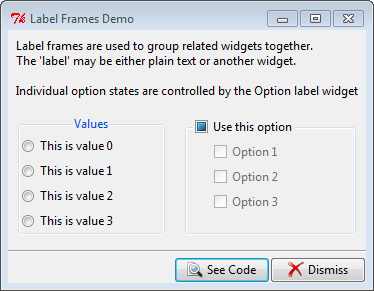
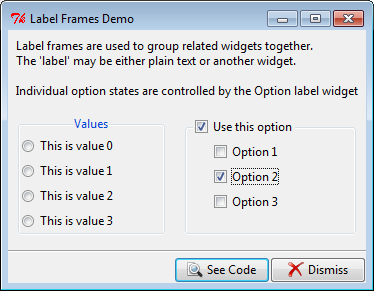
Tkinter Labelframe Demo
This code is based on the Tcl labelframe.tcl demo. There's very little you can configure on a ttk.Labelframe (border, relief, etc. aren't available). You can; however, re-position the frame title text using combinations of N, S, E, W or you can use an entirely separate widget via the labelwidget option.
Labels:
Tkinter Demos,
Tkinter Windows
Tkinter Image Viewer Demo
This code is based on the Tcl image2.tcl. I've made a few minor changes to the original; used PIL for the image handling and added a filetype filter to limit the types of files that will appear in the Files listbox.
Labels:
Tkinter Demos,
Tkinter Misc Examples
Tuesday, July 24, 2012
Tkinter Image Labels Demo
This code is based on the Tcl image1.py demo. Note that if you want to show non-gif images you'll need to use the Python Imaging Library (PIL ... see the code in Tkinter Demos for an example of usage.) A Python 3 version is available from the University of California, Python Extensions site.
Labels:
Tkinter Demos,
Tkinter Label
Tkinter Icon Buttons Demo
This code is based on the Tcl icons.py demo. The interesting bit was in styling the Checkbuttons. In the original demo both appeared as buttons without the 'checkbox' indicators; one appeared sunken when selected, the other had it's background colour changed.
ttk.Checkbuttons do not have the indicatoron option so how to get rid of the 'checkbox' was a bit of a head scratcher which turned out to have a surprisingly simple solution. By setting the style to TButton (vs TCheckbutton) the 'checkbox' disappears; then, when the checkbutton is selected, the style is set to Toolbutton to get the 'sunken button' appearance. The buttons also display a different image depending on their state.
Labels:
Tkinter Buttons,
Tkinter Demos
Subscribe to:
Posts (Atom)