Tuesday, January 31, 2012

Qt 4.8 Basic Sort/Filter Model Example - Part 1

The following code is based on the Qt 4.8  Basic Sort/Filter Model Example; listed under Qt Item Views Examples. The original example has one class, Window, and is split over two files: main.cpp and window.cpp with associated header files. Here they've been combined in one module file built up in three stages.

The example demonstrates the use of QSortProxyModel, QStandardItemModel and QTreeView. One standard item model is used to create two views containing the same data. The second view uses a proxy model to allow sorting and filtering. Changes in the second view are not reflected in the first view even though the underlying models are the same.

Part 1 creates the basic GUI.


#!/usr/bin/env python3
# -*- coding: utf-8 -*-

'''
    PyQt4 conversion of Qt Basic Sort/Filter Example
    
        The Basic Sort/Filter Model example illustrates how to use 
        QSortFilterProxyModel to perform basic sorting and filtering.
          
    BEHAVIOUR:
    =========
    GUI is laid out. The initial conditions for each widget
    are in place. Both the case sentivity checkboxes are checked.
    The Filter Column combobox is set to 'Sender'.
    
    NOTES:
    =====
    Create Window class and implement methods to build the GUI
    (refactored the original C++ to split the creation of the
     various screen areas up for easier reading.)
     
    Create signal/slot connections, adding stub methods for the slots.
    
last modified: 2012-01-30 jg
ref:
    http://developer.qt.nokia.com/doc/qt-4.8/itemviews-basicsortfiltermodel.html
    
'''
from PyQt4.QtGui import (QApplication, QWidget, QGroupBox, QHBoxLayout, QLabel,
                         QVBoxLayout, QGridLayout, QTreeView, QSortFilterProxyModel,
                         QCheckBox, QLineEdit, QComboBox, QStandardItemModel)
from PyQt4.QtCore import (Qt, pyqtSlot, QRegExp)

class Window(QWidget):
    def __init__(self, parent=None):    # initialise base class
        super(Window, self).__init__(parent)

        layout = QVBoxLayout()
        layout.addWidget(self._createSourcePanel())
        layout.addWidget(self._createProxyPanel())
        self.setLayout(layout)

    # private methods ---------------------------------------------------------
    def _createSourcePanel(self):
        sourceGroupBox = QGroupBox(self.tr("Original Model"))
        sourceView = QTreeView()
        sourceView.setRootIsDecorated(False)
        sourceView.setAlternatingRowColors(True)

        sourceLayout = QHBoxLayout()
        sourceLayout.addWidget(sourceView)
        sourceGroupBox.setLayout(sourceLayout)

        return sourceGroupBox

    def _createProxyPanel(self):
        proxyGroupBox = QGroupBox(self.tr("Sorted/Filter Model"))
        proxyView = QTreeView()
        proxyView.setRootIsDecorated(False)
        proxyView.setAlternatingRowColors(True)
        proxyView.sortByColumn(1, Qt.AscendingOrder)

        proxyModel = QSortFilterProxyModel()
        proxyModel.setDynamicSortFilter(True)
        proxyView.setModel(proxyModel)
        proxyView.setSortingEnabled(True)   # click col hdr to sort

        proxyLayout = QVBoxLayout()
        proxyLayout.addWidget(proxyView)
        proxyLayout.addLayout(self._createProxyFilterPanel())
        proxyGroupBox.setLayout(proxyLayout)

        return proxyGroupBox

    def _createProxyFilterPanel(self):
        sortCaseSensitivityCheckBox = QCheckBox(self.tr("Case sensitive sorting"));
        sortCaseSensitivityCheckBox.setChecked(True)
        filterCaseSensitivityCheckBox = QCheckBox(self.tr("Case sensitive filter"));
        filterCaseSensitivityCheckBox.setChecked(True)

        filterPatternLineEdit = QLineEdit();
        filterPatternLabel = QLabel(self.tr("&Filter pattern:"));
        filterPatternLabel.setBuddy(filterPatternLineEdit);

        filterSyntaxComboBox = QComboBox();
        filterSyntaxComboBox.addItem(self.tr("Regular expression"), QRegExp.RegExp);
        filterSyntaxComboBox.addItem(self.tr("Wildcard"), QRegExp.Wildcard);
        filterSyntaxComboBox.addItem(self.tr("Fixed string"), QRegExp.FixedString);
        filterSyntaxLabel = QLabel(self.tr("Filter &syntax:"));
        filterSyntaxLabel.setBuddy(filterSyntaxComboBox);

        filterColumnComboBox = QComboBox();
        filterColumnComboBox.addItem(self.tr("Subject"));
        filterColumnComboBox.addItem(self.tr("Sender"));
        filterColumnComboBox.addItem(self.tr("Date"));
        filterColumnComboBox.setCurrentIndex(1)
        filterColumnLabel = QLabel(self.tr("Filter &column:"));
        filterColumnLabel.setBuddy(filterColumnComboBox);

        # connect signals/slots for event handling
        filterPatternLineEdit.textChanged.connect(self._filterRegExpChanged)
        filterSyntaxComboBox.currentIndexChanged.connect(self._filterRegExpChanged)
        filterColumnComboBox.currentIndexChanged.connect(self._filterColumnChanged)
        filterCaseSensitivityCheckBox.toggled.connect(self._filterRegExpChanged)
        sortCaseSensitivityCheckBox.toggled.connect(self._sortChanged)

        grid = QGridLayout()
        grid.addWidget(filterPatternLabel, 0, 0)
        grid.addWidget(filterPatternLineEdit, 0, 1)
        grid.addWidget(filterSyntaxLabel, 1, 0)
        grid.addWidget(filterSyntaxComboBox, 1, 1)
        grid.addWidget(filterColumnLabel, 2, 0)
        grid.addWidget(filterColumnComboBox, 2, 1)
        grid.addWidget(filterCaseSensitivityCheckBox, 3, 0)
        grid.addWidget(sortCaseSensitivityCheckBox, 3, 1, Qt.AlignRight)

        return grid

    # private slots -----------------------------------------------------------
    @pyqtSlot()
    def _filterRegExpChanged(self):
        pass

    @pyqtSlot()
    def _filterColumnChanged(self):
        pass

    @pyqtSlot()
    def _sortChanged(self):
        pass


# main ========================================================================
def main():
    import sys

    app = QApplication(sys.argv)
    mw = Window()
    mw.setWindowTitle("Basic Sort/Filter Model - Part 1")
    mw.resize(500, 450)
    mw.show()

    sys.exit(app.exec_())

if __name__ == '__main__':
    main()

Qt 4.8 Basic Sort/Filter Model Example - Part 2

In Part 2 the underlying model is created and populated with demo data. The proxy view is initially set to sort alphabetically on the Sender column.


#!/usr/bin/env python3
# -*- coding: utf-8 -*-

'''
    PyQt4 conversion of Qt Basic Sort/Filter Example
    
        The Basic Sort/Filter Model example illustrates how to use 
        QSortFilterProxyModel to perform basic sorting and filtering.
          
    BEHAVIOUR:
    =========
    Data has been added, with both panels using the same
    data model. 
    The data in the Sort/Filter panel is sorted by 'Sender'.
    Clicking the column headers re-sorts the data.
    
    NOTES:
    =====
    Changes to Window class:
        - added public method setSourceModel()
        - re-defined proxyView and sourceView as attributes
        
    Module:
        - added createMailModel()
        - added addMail()
        - modified main() to set the windows source model
    
    
last modified: 2012-01-30 jg
ref:
    http://developer.qt.nokia.com/doc/qt-4.8/itemviews-basicsortfiltermodel.html
    
'''
from PyQt4.QtGui import (QApplication, QWidget, QGroupBox, QHBoxLayout, QLabel,
                         QVBoxLayout, QGridLayout, QTreeView, QSortFilterProxyModel,
                         QCheckBox, QLineEdit, QComboBox, QStandardItemModel)
from PyQt4.QtCore import (Qt, pyqtSlot, QRegExp, QDateTime, QDate, QTime)

class Window(QWidget):
    def __init__(self, parent=None):    # initialise base class
        super(Window, self).__init__(parent)

        layout = QVBoxLayout()
        layout.addWidget(self._createSourcePanel())
        layout.addWidget(self._createProxyPanel())
        self.setLayout(layout)

    # public methods ----------------------------------------------------------
    def setSourceModel(self, model):
        self._proxyModel.setSourceModel(model)
        self._sourceView.setModel(model)

    # private methods ---------------------------------------------------------
    def _createSourcePanel(self):
        sourceGroupBox = QGroupBox(self.tr("Original Model"))
        self._sourceView = QTreeView()
        self._sourceView.setRootIsDecorated(False)
        self._sourceView.setAlternatingRowColors(True)

        sourceLayout = QHBoxLayout()
        sourceLayout.addWidget(self._sourceView)
        sourceGroupBox.setLayout(sourceLayout)

        return sourceGroupBox

    def _createProxyPanel(self):
        proxyGroupBox = QGroupBox(self.tr("Sorted/Filter Model"))
        proxyView = QTreeView()
        proxyView.setRootIsDecorated(False)
        proxyView.setAlternatingRowColors(True)
        proxyView.sortByColumn(1, Qt.AscendingOrder)

        self._proxyModel = QSortFilterProxyModel()
        self._proxyModel.setDynamicSortFilter(True)
        proxyView.setModel(self._proxyModel)
        proxyView.setSortingEnabled(True)   # click col hdr to sort

        proxyLayout = QVBoxLayout()
        proxyLayout.addWidget(proxyView)
        proxyLayout.addLayout(self._createProxyFilterPanel())
        proxyGroupBox.setLayout(proxyLayout)

        return proxyGroupBox

    def _createProxyFilterPanel(self):
        sortCaseSensitivityCheckBox = QCheckBox(self.tr("Case sensitive sorting"));
        sortCaseSensitivityCheckBox.setChecked(True)
        filterCaseSensitivityCheckBox = QCheckBox(self.tr("Case sensitive filter"));
        filterCaseSensitivityCheckBox.setChecked(True)

        filterPatternLineEdit = QLineEdit();
        filterPatternLabel = QLabel(self.tr("&Filter pattern:"));
        filterPatternLabel.setBuddy(filterPatternLineEdit);

        filterSyntaxComboBox = QComboBox();
        filterSyntaxComboBox.addItem(self.tr("Regular expression"), QRegExp.RegExp);
        filterSyntaxComboBox.addItem(self.tr("Wildcard"), QRegExp.Wildcard);
        filterSyntaxComboBox.addItem(self.tr("Fixed string"), QRegExp.FixedString);
        filterSyntaxLabel = QLabel(self.tr("Filter &syntax:"));
        filterSyntaxLabel.setBuddy(filterSyntaxComboBox);

        filterColumnComboBox = QComboBox();
        filterColumnComboBox.addItem(self.tr("Subject"));
        filterColumnComboBox.addItem(self.tr("Sender"));
        filterColumnComboBox.addItem(self.tr("Date"));
        filterColumnComboBox.setCurrentIndex(1)
        filterColumnLabel = QLabel(self.tr("Filter &column:"));
        filterColumnLabel.setBuddy(filterColumnComboBox);

        # connect signals/slots for event handling
        filterPatternLineEdit.textChanged.connect(self._filterRegExpChanged)
        filterSyntaxComboBox.currentIndexChanged.connect(self._filterRegExpChanged)
        filterColumnComboBox.currentIndexChanged.connect(self._filterColumnChanged)
        filterCaseSensitivityCheckBox.toggled.connect(self._filterRegExpChanged)
        sortCaseSensitivityCheckBox.toggled.connect(self._sortChanged)

        grid = QGridLayout()
        grid.addWidget(filterPatternLabel, 0, 0)
        grid.addWidget(filterPatternLineEdit, 0, 1)
        grid.addWidget(filterSyntaxLabel, 1, 0)
        grid.addWidget(filterSyntaxComboBox, 1, 1)
        grid.addWidget(filterColumnLabel, 2, 0)
        grid.addWidget(filterColumnComboBox, 2, 1)
        grid.addWidget(filterCaseSensitivityCheckBox, 3, 0)
        grid.addWidget(sortCaseSensitivityCheckBox, 3, 1, Qt.AlignRight)

        return grid

    # private slots -----------------------------------------------------------
    @pyqtSlot()
    def _filterRegExpChanged(self):
        pass

    @pyqtSlot()
    def _filterColumnChanged(self):
        pass

    @pyqtSlot()
    def _sortChanged(self):
        pass

# createMailModel() ==========================================================
def createMailModel(parent):
    # create, populate and return a 'QStandardItemModel' object
    model = QStandardItemModel(0, 3, parent)

    model.setHeaderData(0, Qt.Horizontal, parent.tr("Subject"))
    model.setHeaderData(1, Qt.Horizontal, parent.tr("Sender"))
    model.setHeaderData(2, Qt.Horizontal, parent.tr("Date"))

    addMail(model, "Happy New Year!", "Grace K. ",
            QDateTime(QDate(2006, 12, 31), QTime(17, 3)))
    addMail(model, "Radically new concept", "Grace K. ",
             QDateTime(QDate(2006, 12, 22), QTime(9, 44)))
    addMail(model, "Accounts", "pascale@nospam.com",
             QDateTime(QDate(2006, 12, 31), QTime(12, 50)))
    addMail(model, "Expenses", "Joe Bloggs ",
             QDateTime(QDate(2006, 12, 25), QTime(11, 39)))
    addMail(model, "Re: Expenses", "Andy ",
             QDateTime(QDate(2007, 1, 2), QTime(16, 5)))
    addMail(model, "Re: Accounts", "Joe Bloggs ",
             QDateTime(QDate(2007, 1, 3), QTime(14, 18)))
    addMail(model, "Re: Accounts", "Andy ",
             QDateTime(QDate(2007, 1, 3), QTime(14, 26)))
    addMail(model, "Sports", "Linda Smith ",
             QDateTime(QDate(2007, 1, 5), QTime(11, 33)))
    addMail(model, "AW: Sports", "Rolf Newschweinstein ",
             QDateTime(QDate(2007, 1, 5), QTime(12, 0)))
    addMail(model, "RE: Sports", "Petra Schmidt ",
             QDateTime(QDate(2007, 1, 5), QTime(12, 1)))

    return model

# addMail() ==================================================================
def addMail(model, subject, sender, date):
    # insert a row of data into the given model
    model.insertRow(0)
    model.setData(model.index(0, 0), subject)
    model.setData(model.index(0, 1), sender)
    model.setData(model.index(0, 2), date)

# main ========================================================================
def main():
    import sys

    app = QApplication(sys.argv)
    mw = Window()
    mw.setSourceModel(createMailModel(mw))
    mw.setWindowTitle("Basic Sort/Filter Model - Part 2")
    mw.resize(500, 450)
    mw.show()

    sys.exit(app.exec_())

if __name__ == '__main__':
    main()

Qt 4.8 Basic Sort/Filter Model Example - Part 3

In Part 3 the slots to handle user events are implemented and an initial Regular Expression filter is setup.


#!/usr/bin/env python3
# -*- coding: utf-8 -*-

'''
    PyQt4 conversion of Qt Basic Sort/Filter Example
    
        The Basic Sort/Filter Model example illustrates how to use 
        QSortFilterProxyModel to perform basic sorting and filtering.
          
    BEHAVIOUR:
    =========
    Filter options are implemented. Try different regular expressions,
    change the filter column or the sort column.
    
    NOTES:
    =====
    Implemented private slots:
        _filterRegExpChanged()
        _filterColumnChanged()
        _sortChanged()
        
    Redefined filterSyntaxComboBox, filterCaseSensitivityCheckBox,
    sortCaseSensitivityCheckBox, filterSyntaxComboBox and 
    filterPatternLineEdit as attributes.
    
last modified: 2012-01-30 jg
ref:
    http://developer.qt.nokia.com/doc/qt-4.8/itemviews-basicsortfiltermodel.html
    
'''
from PyQt4.QtGui import (QApplication, QWidget, QGroupBox, QHBoxLayout, QLabel,
                         QVBoxLayout, QGridLayout, QTreeView, QSortFilterProxyModel,
                         QCheckBox, QLineEdit, QComboBox, QStandardItemModel)
from PyQt4.QtCore import (Qt, pyqtSlot, QRegExp, QDateTime, QDate, QTime)

class Window(QWidget):
    def __init__(self, parent=None):    # initialise base class
        super(Window, self).__init__(parent)

        layout = QVBoxLayout()
        layout.addWidget(self._createSourcePanel())
        layout.addWidget(self._createProxyPanel())
        self.setLayout(layout)

        # set initial filter column and regexp
        self._filterColumnComboBox.setCurrentIndex(1)
        self._filterPatternLineEdit.setText("Grace|Andy")

    # public methods ----------------------------------------------------------
    def setSourceModel(self, model):
        self._proxyModel.setSourceModel(model)
        self._sourceView.setModel(model)

    # private methods ---------------------------------------------------------
    def _createSourcePanel(self):
        sourceGroupBox = QGroupBox(self.tr("Original Model"))
        self._sourceView = QTreeView()
        self._sourceView.setRootIsDecorated(False)
        self._sourceView.setAlternatingRowColors(True)

        sourceLayout = QHBoxLayout()
        sourceLayout.addWidget(self._sourceView)
        sourceGroupBox.setLayout(sourceLayout)

        return sourceGroupBox

    def _createProxyPanel(self):
        proxyGroupBox = QGroupBox(self.tr("Sorted/Filter Model"))
        proxyView = QTreeView()
        proxyView.setRootIsDecorated(False)
        proxyView.setAlternatingRowColors(True)
        proxyView.sortByColumn(1, Qt.AscendingOrder)

        self._proxyModel = QSortFilterProxyModel()
        self._proxyModel.setDynamicSortFilter(True)
        proxyView.setModel(self._proxyModel)
        proxyView.setSortingEnabled(True)   # click col hdr to sort

        proxyLayout = QVBoxLayout()
        proxyLayout.addWidget(proxyView)
        proxyLayout.addLayout(self._createProxyFilterPanel())
        proxyGroupBox.setLayout(proxyLayout)

        return proxyGroupBox

    def _createProxyFilterPanel(self):

        self._sortCaseSensitivityCheckBox = QCheckBox(self.tr("Case sensitive sorting"));
        self._filterCaseSensitivityCheckBox = QCheckBox(self.tr("Case sensitive filter"));

        # default for case sensitivity is true so check boxes
        self._sortCaseSensitivityCheckBox.setChecked(True)
        self._filterCaseSensitivityCheckBox.setChecked(True)

        self._filterPatternLineEdit = QLineEdit();
        filterPatternLabel = QLabel(self.tr("&Filter pattern:"));
        filterPatternLabel.setBuddy(self._filterPatternLineEdit);

        self._filterSyntaxComboBox = QComboBox();
        self._filterSyntaxComboBox.addItem(self.tr("Regular expression"), QRegExp.RegExp);
        self._filterSyntaxComboBox.addItem(self.tr("Wildcard"), QRegExp.Wildcard);
        self._filterSyntaxComboBox.addItem(self.tr("Fixed string"), QRegExp.FixedString);
        filterSyntaxLabel = QLabel(self.tr("Filter &syntax:"));
        filterSyntaxLabel.setBuddy(self._filterSyntaxComboBox);

        self._filterColumnComboBox = QComboBox();
        self._filterColumnComboBox.addItem(self.tr("Subject"));
        self._filterColumnComboBox.addItem(self.tr("Sender"));
        self._filterColumnComboBox.addItem(self.tr("Date"));
        filterColumnLabel = QLabel(self.tr("Filter &column:"));
        filterColumnLabel.setBuddy(self._filterColumnComboBox);

        # connect signals/slots for event handling
        self._filterPatternLineEdit.textChanged.connect(self._filterRegExpChanged)
        self._filterSyntaxComboBox.currentIndexChanged.connect(self._filterRegExpChanged)
        self._filterColumnComboBox.currentIndexChanged.connect(self._filterColumnChanged)
        self._filterCaseSensitivityCheckBox.toggled.connect(self._filterRegExpChanged)
        self._sortCaseSensitivityCheckBox.toggled.connect(self._sortChanged)

        grid = QGridLayout()
        grid.addWidget(filterPatternLabel, 0, 0)
        grid.addWidget(self._filterPatternLineEdit, 0, 1)
        grid.addWidget(filterSyntaxLabel, 1, 0)
        grid.addWidget(self._filterSyntaxComboBox, 1, 1)
        grid.addWidget(filterColumnLabel, 2, 0)
        grid.addWidget(self._filterColumnComboBox, 2, 1)
        grid.addWidget(self._filterCaseSensitivityCheckBox, 3, 0)
        grid.addWidget(self._sortCaseSensitivityCheckBox, 3, 1, Qt.AlignRight)

        return grid


    # private slots ----------------------------------------------------------- 
    @pyqtSlot()
    def _filterRegExpChanged(self):
        # get the QRegEx.PatternSyntax enum value
        # 0 - Regular Expression
        # 1 - Wildcard
        # 2 - Fixed String
        syntax = self._filterSyntaxComboBox.itemData(
                    self._filterSyntaxComboBox.currentIndex())

        # get case sensitivity
        cs = Qt.CaseInsensitive
        if self._filterCaseSensitivityCheckBox.isChecked():
            cs = Qt.CaseSensitive

        # get user regex pattern
        pattern = self._filterPatternLineEdit.text()

        # build filter and update proxy model
        regExp = QRegExp(pattern, cs, syntax)
        self._proxyModel.setFilterRegExp(regExp)

    @pyqtSlot()
    def _filterColumnChanged(self):
        self._proxyModel.setFilterKeyColumn(
                            self._filterColumnComboBox.currentIndex())

    @pyqtSlot()
    def _sortChanged(self):
        cs = Qt.CaseInsensitive

        if self._sortCaseSensitivityCheckBox.isChecked():
            cs = Qt.CaseSensitive

        self._proxyModel.setSortCaseSensitivity(cs)

# createMailModel() ==========================================================
def createMailModel(parent):
    # create, populate and return a 'QStandardItemModel' object
    model = QStandardItemModel(0, 3, parent)

    model.setHeaderData(0, Qt.Horizontal, parent.tr("Subject"))
    model.setHeaderData(1, Qt.Horizontal, parent.tr("Sender"))
    model.setHeaderData(2, Qt.Horizontal, parent.tr("Date"))

    addMail(model, "Happy New Year!", "Grace K. ",
            QDateTime(QDate(2006, 12, 31), QTime(17, 3)))
    addMail(model, "Radically new concept", "Grace K. ",
             QDateTime(QDate(2006, 12, 22), QTime(9, 44)))
    addMail(model, "Accounts", "pascale@nospam.com",
             QDateTime(QDate(2006, 12, 31), QTime(12, 50)))
    addMail(model, "Expenses", "Joe Bloggs ",
             QDateTime(QDate(2006, 12, 25), QTime(11, 39)))
    addMail(model, "Re: Expenses", "Andy ",
             QDateTime(QDate(2007, 1, 2), QTime(16, 5)))
    addMail(model, "Re: Accounts", "Joe Bloggs ",
             QDateTime(QDate(2007, 1, 3), QTime(14, 18)))
    addMail(model, "Re: Accounts", "Andy ",
             QDateTime(QDate(2007, 1, 3), QTime(14, 26)))
    addMail(model, "Sports", "Linda Smith ",
             QDateTime(QDate(2007, 1, 5), QTime(11, 33)))
    addMail(model, "AW: Sports", "Rolf Newschweinstein ",
             QDateTime(QDate(2007, 1, 5), QTime(12, 0)))
    addMail(model, "RE: Sports", "Petra Schmidt ",
             QDateTime(QDate(2007, 1, 5), QTime(12, 1)))

    return model

# addMail() ==================================================================
def addMail(model, subject, sender, date):
    # insert a row of data into the given model
    model.insertRow(0)
    model.setData(model.index(0, 0), subject)
    model.setData(model.index(0, 1), sender)
    model.setData(model.index(0, 2), date)

# main ========================================================================
def main():
    import sys

    app = QApplication(sys.argv)
    mw = Window()
    mw.setSourceModel(createMailModel(mw))
    mw.setWindowTitle("Basic Sort/Filter Model - Part 3")
    mw.resize(500, 450)
    mw.show()

    sys.exit(app.exec_())

if __name__ == '__main__':
    main()

Monday, January 30, 2012

Qt 4.8 Address Book Example - Part 1

The following code is based on the Qt Address Book Example, one of their ItemViews Examples.  The example uses  QTableView, QTabWidget and QSortFilterProxyModel to display entries grouped alphabetically on tabbed pages.


The conversion from C++ to PyQt4 is given here in 5 parts; the last includes two modifications to the original code.

The example consists of six C++ classes: Main, MainWindow, AddressWidget, TableModel, NewAddressTab, AddDialog and their corresponding header files.

Part 1 implements the Main and MainWindow classes with stubs for the AddressWidget class.  Note that Main is not implemented as a separate class in Python and that all classes are defined in one module file.


#!/usr/bin/env python3
# -*- coding: utf-8 -*-

'''
    PyQt4 conversion of Qt Address Book (Tabbed) Example
    
        The address book example shows how to use proxy models to display 
        different views onto data from a single model.
        
        This example provides an address book that allows contacts to be 
        grouped alphabetically into 9 groups: 
            ABC, DEF, GHI, ... , VW, ..., XYZ. 
        This is achieved by using multiple views on the same model, each of 
        which is filtered using an instance of the QSortFilterProxyModel class.
          
    BEHAVIOUR:
    =========
        Basic application shell and menus created. Menu items, other than
        Exit, are not fully functional.
    
    NOTES:
    =====
    The application is based on five classes:
        Mainwindow
        AddressWidget
        TabelModel
        NewAddressTab
        AddDialog
        
    The original C++ is an example rather than a tutorial; each class
    occupies its own file with associated include files.
    
    Here the application is built up, starting with MainWindow
    stubs for the other classes are defined as encountered, to be 
    implemented in later steps.
    
last modified: 2012-01-29 jg
ref:
    http://developer.qt.nokia.com/doc/qt-4.8/itemviews-addressbook.html
    
'''
from PyQt4.QtGui import (QApplication, QMainWindow, QWidget, QTabWidget, QAction,
                         QFileDialog, QItemSelection)
from PyQt4.QtCore import (pyqtSlot, pyqtSignal)

class AddressWidget(QWidget):
    def __init__(self, parent=None):    # initialise base class
        super(AddressWidget, self).__init__(parent)

    # signals --------------------------------------------------------------
    selectionChanged = pyqtSignal(QItemSelection, name="selectionChanged")

    # public slots ---------------------------------------------------------
    @pyqtSlot(str, str)
    def addEntry(self, name='', address=''):
        pass

    @pyqtSlot()
    def editEntry(self):
        pass

    @pyqtSlot()
    def removeEntry(self):
        pass

    # public methods ---------------------------------------------------------
    def readFromFile(self, fname):
        pass

    def writeToFile(self, fname):
        pass

class MainWindow(QMainWindow):

    def __init__(self, parent=None):    # initialise base class
        super(MainWindow, self).__init__(parent)

        self._addrWidget = AddressWidget()
        self.setCentralWidget(self._addrWidget)
        self._createFileMenu()      # extracted from createMenus()
        self._createToolsMenu()     # extracted from createMenus()
        self._addrWidget.selectionChanged.connect(self._updateActions)
        self.setWindowTitle(self.tr("Address Book - Part 1"))

    # private methods ---------------------------------------------------------
    def _createFileMenu(self):
        # create actions
        openAct = QAction(self.tr("&Open..."), self)
        saveAct = QAction(self.tr("&Save..."), self)
        exitAct = QAction(self.tr("E&xit"), self)

        # connect signals/slots for event handling
        openAct.triggered.connect(self._openFile)
        saveAct.triggered.connect(self._saveFile)
        exitAct.triggered.connect(QApplication.instance().exit)

        # create menu
        fileMenu = self.menuBar().addMenu(self.tr("&File"))
        fileMenu.addAction(openAct)
        fileMenu.addAction(saveAct)
        fileMenu.addSeparator()
        fileMenu.addAction(exitAct)

    def _createToolsMenu(self):
        # create actions
        addAct = QAction(self.tr("&Add Entry..."), self)
        self._editAct = QAction(self.tr("&EditEntry..."), self)
        self._removeAct = QAction(self.tr("&Remove Entry"), self)

        # connect signals/slots for event handling
        addAct.triggered.connect(self._addrWidget.addEntry)
        self._editAct.triggered.connect(self._addrWidget.editEntry)
        self._removeAct.triggered.connect(self._addrWidget.removeEntry)

        # create menu
        toolMenu = self.menuBar().addMenu(self.tr("&Tools"))
        toolMenu.addAction(addAct)
        toolMenu.addAction(self._editAct)
        toolMenu.addSeparator()
        toolMenu.addAction(self._removeAct)

        # set menu item visibility
        self._editAct.setEnabled(False)
        self._removeAct.setEnabled(False)

    # private slots ---------------------------------------------------------
    @pyqtSlot()
    def _openFile(self):
        fname = QFileDialog.getOpenFileName(self)
        if fname:
            self._addrWidget.readFromFile(fname)

    @pyqtSlot()
    def _saveFile(self):
        fname = QFileDialog.getSaveFileName(self)
        if fname:
            self._addrWidget.writeToFile(fname)

    @pyqtSlot(QItemSelection)
    def _updateActions(self, sel):
        indexes = sel.indexes()

        if indexes:
            self._removeAct.setEnabled(True)
            self._editAct.setEnabled(True)
        else:
            self._removeAct.setEnabled(False)
            self._editAct.setEnabled(False)


# main ========================================================================
def main():
    import sys

    app = QApplication(sys.argv)
    mw = MainWindow()
    mw.show()

    sys.exit(app.exec_())

if __name__ == '__main__':
    main()

Qt 4.8 Address Book Example - Part 2

Part 2 implements the methods and classes needed to initialize the AddressWidget; this includes the full  implementation of the TableModel and NewAddressTab classes.


#!/usr/bin/env python3
# -*- coding: utf-8 -*-

'''
    PyQt4 conversion of Qt Address Book (Tabbed) Example
    
        The address book example shows how to use proxy models to display 
        different views onto data from a single model.
        
        This example provides an address book that allows contacts to be 
        grouped alphabetically into 9 groups: 
            ABC, DEF, GHI, ... , VW, ..., XYZ. 
        This is achieved by using multiple views on the same model, each of 
        which is filtered using an instance of the QSortFilterProxyModel class.
          
    BEHAVIOUR:
    =========
        Address tabs are visible and can be selected.
        
    NOTES:
    =====
        Implemented initialisation methods in AddressWidget
        which required the implementation of the TableModel
        and NewAddressTab classes.

        The Qt version of TableModel uses a list of QPair
        objects; QPair is not implemented in PyQt4; a 'list
        of lists' in the form:
            [ [str, str], [str,str], etc.]
         is used instead.
    
last modified: 2012-01-29 jg
ref:
    http://developer.qt.nokia.com/doc/qt-4.8/itemviews-addressbook.html
    
'''
from PyQt4.QtGui import (QApplication, QMainWindow, QWidget, QAction, QFileDialog,
                         QLabel, QPushButton, QVBoxLayout, QSortFilterProxyModel,
                         QTableView, QAbstractItemView, QTabWidget, QItemSelection)
from PyQt4.QtCore import (pyqtSlot, pyqtSignal, Qt, QAbstractTableModel, QModelIndex,
                          QRegExp)

class NewAddressTab(QWidget):
    def __init__(self, parent=None):    # initialise base class
        super(NewAddressTab, self).__init__(parent)

        descripLabel = QLabel(self.tr(
                        "There are currently no contacts in your Address Book"
                        "\nClick Add to add new contacts."))
        addBtn = QPushButton(self.tr("Add"))
        addBtn.clicked.connect(self._addEntry)

        layout = QVBoxLayout()
        layout.addWidget(descripLabel)
        layout.addWidget(addBtn)
        self.setLayout(layout)

    def _addEntry(self):
        pass


class TableModel(QAbstractTableModel):
    def __init__(self, parent=None, pairs=[['', '']]):    # initialise base class
        super(TableModel, self).__init__(parent)
        self._listOfPairs = pairs

    # overridden methods ------------------------------------------------------
    def rowCount(self, parent=QModelIndex()):
        return len(self._listOfPairs)

    def columnCount(self, parent=QModelIndex()):
        return 2

    def data(self, index, role):
        if not index.isValid():
            return None

        if (index.row() >= len(self._listOfPairs) or
            index.row() < 0):
            return None

        if role == Qt.DisplayRole:
            row = index.row()
            pair = self._listOfPairs[row]

            if index.column() == 0:
                return pair[0]
            elif index.column == 1:
                return pair[1]

        return None

    def headerData(self, section, orientation, role):
        if role != Qt.DisplayRole:
            return None

        if orientation == Qt.Horizontal:
            if section == 0: return self.tr("Name")
            elif section == 1: return self.tr("Address")
            else: return None

        return None

    def insertRows(self, position, rows, index=QModelIndex()):
        self.beginInsertRows(QModelIndex(), position, position + rows - 1)

        for r in range(rows):
            pair = [" ", " "]
            self._listOfPairs.insert(position, pair)

        self.endInsertRows()
        return True

    def removeRows(self, position, rows, index=QModelIndex()):
        self.beginRemoveRows(QModelIndex(), position, position + rows - 1)

        for r in range(rows):
            # use list slicing to remove rows
            self._listOfPairs = (self._listOfPairs[:position] +
                                 self._listOfPairs[position + rows:])

        self.endRemoveRows()
        return True

    def setData(self, index, value, role=Qt.EditRole):
        if index.isValid() and role == Qt.EditRole:
            row = index.row()
            pair = self._listOfPairs(row)

            if index.column() == 0:
                pair[0] = value
            elif index.column() == 1:
                pair[1] = value
            else:
                return False

            self._listOfPairs[row] = pair
            return True

        return False

    def flags(self, index):
        if not index.isValid():
            return Qt.ItemIsEnabled
        return Qt.ItemFlags(QAbstractTableModel.flags(self, index) |
                            Qt.ItemIsEditable)

    # public methods ----------------------------------------------------------
    def getList(self):
        return self._listOfPairs

class AddressWidget(QTabWidget):
    def __init__(self, parent=None):    # initialise base class
        super(AddressWidget, self).__init__(parent)

        self._table = TableModel(self)
        newAddressTab = NewAddressTab(self)
        self.addTab(newAddressTab, "Address Book")

        self._setUpTabs()

    # signals --------------------------------------------------------------
    selectionChanged = pyqtSignal(QItemSelection, name="selectionChanged")

    # public slots ---------------------------------------------------------
    @pyqtSlot(str, str)
    def addEntry(self, name='', address=''):
        pass

    @pyqtSlot()
    def editEntry(self):
        pass

    @pyqtSlot()
    def removeEntry(self):
        pass

    # public methods ---------------------------------------------------------
    def readFromFile(self, fname):
        pass

    def writeToFile(self, fname):
        pass

    # private methods ---------------------------------------------------------
    def _setUpTabs(self):
        groups = ["ABC", "DEF", "GHI", "JKL", "MNO", "PQR", "STU", "VW", "XYZ"]

        for i in range(len(groups)):
            tabName = groups[i]     # 'str' is a reserved word in Python

            proxyModel = QSortFilterProxyModel(self)
            proxyModel.setSourceModel(self._table)
            proxyModel.setDynamicSortFilter(True)

            tableView = QTableView()
            tableView.setModel(proxyModel)
            tableView.setSortingEnabled(True)
            tableView.setSelectionBehavior(QAbstractItemView.SelectRows)
            tableView.horizontalHeader().setStretchLastSection(True)
            tableView.verticalHeader().hide()
            tableView.setEditTriggers(QAbstractItemView.NoEditTriggers)
            tableView.setSelectionMode(QAbstractItemView.SingleSelection)

            newStr = "^{0}.*".format(tabName)
            proxyModel.setFilterRegExp(QRegExp(newStr, Qt.CaseInsensitive))
            proxyModel.setFilterKeyColumn(0)
            proxyModel.sort(0, Qt.AscendingOrder)

            tableView.selectionModel().selectionChanged.connect(self.selectionChanged)

            self.addTab(tableView, tabName)


class MainWindow(QMainWindow):

    def __init__(self, parent=None):    # initialise base class
        super(MainWindow, self).__init__(parent)

        self._addrWidget = AddressWidget()
        self.setCentralWidget(self._addrWidget)
        self._createFileMenu()      # extracted from createMenus()
        self._createToolsMenu()     # extracted from createMenus()
        self._addrWidget.selectionChanged.connect(self._updateActions)
        self.setWindowTitle(self.tr("Address Book - Part 2"))

    # private methods ---------------------------------------------------------
    def _createFileMenu(self):
        # create actions
        openAct = QAction(self.tr("&Open..."), self)
        saveAct = QAction(self.tr("&Save..."), self)
        exitAct = QAction(self.tr("E&xit"), self)

        # connect signals/slots for event handling
        openAct.triggered.connect(self._openFile)
        saveAct.triggered.connect(self._saveFile)
        exitAct.triggered.connect(QApplication.instance().exit)

        # create menu
        fileMenu = self.menuBar().addMenu(self.tr("&File"))
        fileMenu.addAction(openAct)
        fileMenu.addAction(saveAct)
        fileMenu.addSeparator()
        fileMenu.addAction(exitAct)

    def _createToolsMenu(self):
        # create actions
        addAct = QAction(self.tr("&Add Entry..."), self)
        self._editAct = QAction(self.tr("&EditEntry..."), self)
        self._removeAct = QAction(self.tr("&Remove Entry"), self)

        # connect signals/slots for event handling
        addAct.triggered.connect(self._addrWidget.addEntry)
        self._editAct.triggered.connect(self._addrWidget.editEntry)
        self._removeAct.triggered.connect(self._addrWidget.removeEntry)

        # create menu
        toolMenu = self.menuBar().addMenu(self.tr("&Tools"))
        toolMenu.addAction(addAct)
        toolMenu.addAction(self._editAct)
        toolMenu.addSeparator()
        toolMenu.addAction(self._removeAct)

        # set menu item visibility
        self._editAct.setEnabled(False)
        self._removeAct.setEnabled(False)

    # private slots ---------------------------------------------------------
    @pyqtSlot()
    def _openFile(self):
        fname = QFileDialog.getOpenFileName(self)
        if fname:
            self._addrWidget.readFromFile(fname)

    @pyqtSlot()
    def _saveFile(self):
        fname = QFileDialog.getSaveFileName(self)
        if fname:
            self._addrWidget.writeToFile(fname)

    @pyqtSlot(QItemSelection)
    def _updateActions(self, sel):
        indexes = sel.indexes()

        if indexes:
            self._removeAct.setEnabled(True)
            self._editAct.setEnabled(True)
        else:
            self._removeAct.setEnabled(False)
            self._editAct.setEnabled(False)


# main ========================================================================
def main():
    import sys

    app = QApplication(sys.argv)
    mw = MainWindow()
    mw.show()

    sys.exit(app.exec_())

if __name__ == '__main__':
    main()

Qt 4.8 Address Book Example - Part 3

In Part 3 the AddressWidget.addEntry() method is implemented along with the last class, AddDialog.


#!/usr/bin/env python3
# -*- coding: utf-8 -*-

'''
    PyQt4 conversion of Qt Address Book (Tabbed) Example
    
        The address book example shows how to use proxy models to display 
        different views onto data from a single model.
        
        This example provides an address book that allows contacts to be 
        grouped alphabetically into 9 groups: 
            ABC, DEF, GHI, ... , VW, ..., XYZ. 
        This is achieved by using multiple views on the same model, each of 
        which is filtered using an instance of the QSortFilterProxyModel class.
          
    BEHAVIOUR:
    =========
    New entries can be added by clicking the 'Add' button or
    selecting 'Tools->Add'.
    
    When the first entry has been added, the 'Address Book'
    tab is removed.
    
    NOTES:
    =====
        Implemented last custom class, AddDialog.
        Implemented addEntry() in AddressWidget and NewAddressTab
    
last modified: 2012-01-29 jg
ref:
    http://developer.qt.nokia.com/doc/qt-4.8/itemviews-addressbook.html
    
'''
from PyQt4.QtGui import (QApplication, QMainWindow, QWidget, QAction, QFileDialog,
                         QLabel, QPushButton, QVBoxLayout, QSortFilterProxyModel,
                         QTableView, QAbstractItemView, QTabWidget, QItemSelection,
                         QDialog, QLineEdit, QTextEdit, QGridLayout, QHBoxLayout,
                         QMessageBox)
from PyQt4.QtCore import (pyqtSlot, pyqtSignal, Qt, QAbstractTableModel, QModelIndex,
                          QRegExp)

class AddDialog(QDialog):
    def __init__(self, parent=None):    # initialise base class
        super(AddDialog, self).__init__(parent)

        nameLabel = QLabel(self.tr("Name"))
        addrLabel = QLabel(self.tr("Address"))
        okBtn = QPushButton(self.tr("OK"))
        cancelBtn = QPushButton(self.tr("Cancel"))

        self.nameText = QLineEdit()
        self.addrText = QTextEdit()

        grid = QGridLayout()
        grid.setColumnStretch(1, 2)
        grid.addWidget(nameLabel, 0, 0)
        grid.addWidget(self.nameText, 0, 1)

        grid.addWidget(addrLabel, 1, 0, Qt.AlignLeft | Qt.AlignTop)
        grid.addWidget(self.addrText, 1, 1, Qt.AlignLeft)

        btnLayout = QHBoxLayout()
        btnLayout.addWidget(okBtn)
        btnLayout.addWidget(cancelBtn)
        grid.addLayout(btnLayout, 2, 1, Qt.AlignRight)

        mainLayout = QVBoxLayout()
        mainLayout.addLayout(grid)
        self.setLayout(mainLayout)

        # connect signals/slots for event handling
        okBtn.clicked.connect(self.accept)
        cancelBtn.clicked.connect(self.reject)

        self.setWindowTitle(self.tr("Add a Contact"))


class NewAddressTab(QWidget):
    def __init__(self, parent=None):    # initialise base class
        super(NewAddressTab, self).__init__(parent)

        descripLabel = QLabel(self.tr(
                        "There are currently no contacts in your Address Book"
                        "\nClick Add to add new contacts."))
        addBtn = QPushButton(self.tr("Add"))
        addBtn.clicked.connect(self._addEntry)

        layout = QVBoxLayout()
        layout.addWidget(descripLabel)
        layout.addWidget(addBtn)
        self.setLayout(layout)

    # signal ------------------------------------------------------------------
    sendDetails = pyqtSignal(str, str, name="sendDetails")

    # private methods ---------------------------------------------------------
    def _addEntry(self):
        aDialog = AddDialog()
        if aDialog.exec():
            name = aDialog.nameText.text()
            addr = aDialog.addrText.toPlainText()

            self.sendDetails.emit(name, addr)


class TableModel(QAbstractTableModel):
    def __init__(self, parent=None, pairs=[['', '']]):    # initialise base class
        super(TableModel, self).__init__(parent)
        self._listOfPairs = pairs

    # overridden methods ------------------------------------------------------
    def rowCount(self, parent=QModelIndex()):
        return len(self._listOfPairs)

    def columnCount(self, parent=QModelIndex()):
        return 2

    def data(self, index, role=Qt.DisplayRole):
        # displays the row contents
        if not index.isValid():
            return None

        if (index.row() >= len(self._listOfPairs) or
            index.row() < 0):
            return None

        if role == Qt.DisplayRole:
            pair = self._listOfPairs[index.row()]

            if index.column() == 0:
                return pair[0]
            elif index.column() == 1:
                return pair[1]

        return None

    def headerData(self, section, orientation, role):
        if role != Qt.DisplayRole:
            return None

        if orientation == Qt.Horizontal:
            if section == 0: return self.tr("Name")
            elif section == 1: return self.tr("Address")
            else: return None

        return None

    def insertRows(self, position, rows, index=QModelIndex()):
        self.beginInsertRows(QModelIndex(), position, position + rows - 1)

        for r in range(rows):
            pair = [" ", " "]
            self._listOfPairs.insert(position, pair)

        self.endInsertRows()
        return True

    def removeRows(self, position, rows, index=QModelIndex()):
        self.beginRemoveRows(QModelIndex(), position, position + rows - 1)

        for r in range(rows):
            # use list slicing to remove rows
            self._listOfPairs = (self._listOfPairs[:position] +
                                 self._listOfPairs[position + rows:])

        self.endRemoveRows()
        return True

    def setData(self, index, value, role=Qt.EditRole):
        # updates the table model and emits a signal
        # to notify views that data has changed
        if index.isValid() and role == Qt.EditRole:
            row = index.row()
            pair = self._listOfPairs[row]

            if index.column() == 0:
                pair[0] = value
            elif index.column() == 1:
                pair[1] = value
            else:
                return False

            self._listOfPairs[row] = pair

            # this signal is defined in the QAbstractTableModel 
            # parent class
            self.dataChanged.emit(index, index)
            return True

        return False

    def flags(self, index):
        if not index.isValid():
            return Qt.ItemIsEnabled
        return Qt.ItemFlags(QAbstractTableModel.flags(self, index) |
                            Qt.ItemIsEditable)


    # public methods ----------------------------------------------------------
    def getList(self):
        return self._listOfPairs

class AddressWidget(QTabWidget):
    def __init__(self, parent=None):    # initialise base class
        super(AddressWidget, self).__init__(parent)

        self._table = TableModel(self)
        self._newAddressTab = NewAddressTab(self)
        self._newAddressTab.sendDetails.connect(self.addEntry)
        self.addTab(self._newAddressTab, "Address Book")

        self._setUpTabs()

    # signals --------------------------------------------------------------
    selectionChanged = pyqtSignal(QItemSelection, name="selectionChanged")

    # public slots ---------------------------------------------------------
    @pyqtSlot(str, str)
    def addEntry(self, name=None, address=None):
        if not name:
            aDialog = AddDialog()
            if aDialog.exec():
                name = aDialog.nameText.text()
                address = aDialog.addrText.toPlainText()

                # recursive call
                self.addEntry(name, address)
        else:
            entries = self._table.getList()
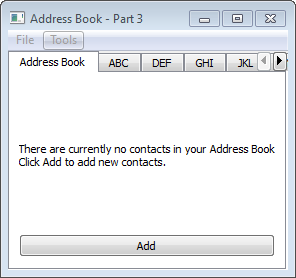
            pair = [name, address]
            if not pair in entries:
                self._table.insertRows(0, 1, QModelIndex())

                index = self._table.index(0, 0, QModelIndex())
                self._table.setData(index, name, Qt.EditRole)

                index = self._table.index(0, 1, QModelIndex())
                self._table.setData(index, address, Qt.EditRole)

                self.removeTab(self.indexOf(self._newAddressTab))
            else:
                QMessageBox.information(
                    self,
                    self.tr("Duplicate Name"),
                    self.tr("The name {0} already exists.".format(name)))

    @pyqtSlot()
    def editEntry(self):
        pass

    @pyqtSlot()
    def removeEntry(self):
        pass

    # public methods ---------------------------------------------------------
    def readFromFile(self, fname):
        pass

    def writeToFile(self, fname):
        pass

    # private methods ---------------------------------------------------------
    def _setUpTabs(self):
        groups = ["ABC", "DEF", "GHI", "JKL", "MNO", "PQR", "STU", "VW", "XYZ"]

        for i in range(len(groups)):
            tabName = groups[i]     # 'str' is a reserved word in Python

            proxyModel = QSortFilterProxyModel(self)
            proxyModel.setSourceModel(self._table)
            proxyModel.setDynamicSortFilter(True)

            tableView = QTableView()
            tableView.setModel(proxyModel)
            tableView.setSortingEnabled(True)
            tableView.setSelectionBehavior(QAbstractItemView.SelectRows)
            tableView.horizontalHeader().setStretchLastSection(True)
            tableView.verticalHeader().hide()
            tableView.setEditTriggers(QAbstractItemView.NoEditTriggers)
            tableView.setSelectionMode(QAbstractItemView.SingleSelection)

            # use a QRegExp to limit names displayed on each tab
            # to their appropriate tab group
            newStr = "^[{0}].*".format(tabName)
            proxyModel.setFilterRegExp(QRegExp(newStr, Qt.CaseInsensitive))
            proxyModel.setFilterKeyColumn(0)
            proxyModel.sort(0, Qt.AscendingOrder)

            tableView.selectionModel().selectionChanged.connect(self.selectionChanged)

            self.addTab(tableView, tabName)


class MainWindow(QMainWindow):

    def __init__(self, parent=None):    # initialise base class
        super(MainWindow, self).__init__(parent)

        self._addrWidget = AddressWidget()
        self.setCentralWidget(self._addrWidget)
        self._createFileMenu()      # extracted from createMenus()
        self._createToolsMenu()     # extracted from createMenus()
        self._addrWidget.selectionChanged.connect(self._updateActions)
        self.setWindowTitle(self.tr("Address Book - Part 3"))

    # private methods ---------------------------------------------------------
    def _createFileMenu(self):
        # create actions
        openAct = QAction(self.tr("&Open..."), self)
        saveAct = QAction(self.tr("&Save..."), self)
        exitAct = QAction(self.tr("E&xit"), self)

        # connect signals/slots for event handling
        openAct.triggered.connect(self._openFile)
        saveAct.triggered.connect(self._saveFile)
        exitAct.triggered.connect(QApplication.instance().exit)

        # create menu
        fileMenu = self.menuBar().addMenu(self.tr("&File"))
        fileMenu.addAction(openAct)
        fileMenu.addAction(saveAct)
        fileMenu.addSeparator()
        fileMenu.addAction(exitAct)

    def _createToolsMenu(self):
        # create actions
        addAct = QAction(self.tr("&Add Entry..."), self)
        self._editAct = QAction(self.tr("&EditEntry..."), self)
        self._removeAct = QAction(self.tr("&Remove Entry"), self)

        # connect signals/slots for event handling
        addAct.triggered.connect(self._addrWidget.addEntry)
        self._editAct.triggered.connect(self._addrWidget.editEntry)
        self._removeAct.triggered.connect(self._addrWidget.removeEntry)

        # create menu
        toolMenu = self.menuBar().addMenu(self.tr("&Tools"))
        toolMenu.addAction(addAct)
        toolMenu.addAction(self._editAct)
        toolMenu.addSeparator()
        toolMenu.addAction(self._removeAct)

        # set menu item visibility
        self._editAct.setEnabled(False)
        self._removeAct.setEnabled(False)

    # private slots ---------------------------------------------------------
    @pyqtSlot()
    def _openFile(self):
        fname = QFileDialog.getOpenFileName(self)
        if fname:
            self._addrWidget.readFromFile(fname)

    @pyqtSlot()
    def _saveFile(self):
        fname = QFileDialog.getSaveFileName(self)
        if fname:
            self._addrWidget.writeToFile(fname)

    @pyqtSlot(QItemSelection)
    def _updateActions(self, sel):
        indexes = sel.indexes()

        if indexes:
            self._removeAct.setEnabled(True)
            self._editAct.setEnabled(True)
        else:
            self._removeAct.setEnabled(False)
            self._editAct.setEnabled(False)


# main ========================================================================
def main():
    import sys

    app = QApplication(sys.argv)
    mw = MainWindow()
    mw.show()

    sys.exit(app.exec_())

if __name__ == '__main__':
    main()

Qt 4.8 Address Book Example - Part 4

In Part 4 the remaining methods in AddWidget (editEntry(), removeEntry(), loadFromFile() and writeToFile() ) are implemented and the example, as given in the C++ code, is complete.


#!/usr/bin/env python3
# -*- coding: utf-8 -*-

'''
    PyQt4 conversion of Qt Address Book (Tabbed) Example
    
        The address book example shows how to use proxy models to display 
        different views onto data from a single model.
        
        This example provides an address book that allows contacts to be 
        grouped alphabetically into 9 groups: 
            ABC, DEF, GHI, ... , VW, ..., XYZ. 
        This is achieved by using multiple views on the same model, each of 
        which is filtered using an instance of the QSortFilterProxyModel class.
          
    BEHAVIOUR:
    =========
    All menu options are working; users can Add, Edit, and Remove
    entries.
    
    NOTES:
    =====
    In AddressWidget:
        implement editEntry() - QModelIndexList is not implemented in PyQt4
        implement removeEntry(), writeToFile(), loadFromFile()
    
last modified: 2012-01-29 jg
ref:
    http://developer.qt.nokia.com/doc/qt-4.8/itemviews-addressbook.html
    
'''
import pickle
from PyQt4.QtGui import (QApplication, QMainWindow, QWidget, QAction, QFileDialog,
                         QLabel, QPushButton, QVBoxLayout, QSortFilterProxyModel,
                         QTableView, QAbstractItemView, QTabWidget, QItemSelection,
                         QDialog, QLineEdit, QTextEdit, QGridLayout, QHBoxLayout,
                         QMessageBox, QItemSelectionModel)
from PyQt4.QtCore import (pyqtSlot, pyqtSignal, Qt, QAbstractTableModel, QModelIndex,
                          QRegExp)

class AddDialog(QDialog):
    def __init__(self, parent=None):    # initialise base class
        super(AddDialog, self).__init__(parent)

        nameLabel = QLabel(self.tr("Name"))
        addrLabel = QLabel(self.tr("Address"))
        okBtn = QPushButton(self.tr("OK"))
        cancelBtn = QPushButton(self.tr("Cancel"))

        self.nameText = QLineEdit()
        self.addrText = QTextEdit()

        grid = QGridLayout()
        grid.setColumnStretch(1, 2)
        grid.addWidget(nameLabel, 0, 0)
        grid.addWidget(self.nameText, 0, 1)

        grid.addWidget(addrLabel, 1, 0, Qt.AlignLeft | Qt.AlignTop)
        grid.addWidget(self.addrText, 1, 1, Qt.AlignLeft)

        btnLayout = QHBoxLayout()
        btnLayout.addWidget(okBtn)
        btnLayout.addWidget(cancelBtn)
        grid.addLayout(btnLayout, 2, 1, Qt.AlignRight)

        mainLayout = QVBoxLayout()
        mainLayout.addLayout(grid)
        self.setLayout(mainLayout)

        # connect signals/slots for event handling
        okBtn.clicked.connect(self.accept)
        cancelBtn.clicked.connect(self.reject)

        self.setWindowTitle(self.tr("Add a Contact"))


class NewAddressTab(QWidget):
    def __init__(self, parent=None):    # initialise base class
        super(NewAddressTab, self).__init__(parent)

        descripLabel = QLabel(self.tr(
                        "There are currently no contacts in your Address Book"
                        "\nClick Add to add new contacts."))
        addBtn = QPushButton(self.tr("Add"))
        addBtn.clicked.connect(self._addEntry)

        layout = QVBoxLayout()
        layout.addWidget(descripLabel)
        layout.addWidget(addBtn)
        self.setLayout(layout)

    # signal ------------------------------------------------------------------
    sendDetails = pyqtSignal(str, str, name="sendDetails")

    # private methods ---------------------------------------------------------
    def _addEntry(self):
        aDialog = AddDialog()
        if aDialog.exec():
            name = aDialog.nameText.text()
            addr = aDialog.addrText.toPlainText()

            self.sendDetails.emit(name, addr)


class TableModel(QAbstractTableModel):
    def __init__(self, parent=None, pairs=[['', '']]):    # initialise base class
        super(TableModel, self).__init__(parent)
        self._listOfPairs = pairs

    # overridden methods ------------------------------------------------------
    def rowCount(self, parent=QModelIndex()):
        return len(self._listOfPairs)

    def columnCount(self, parent=QModelIndex()):
        return 2

    def data(self, index, role=Qt.DisplayRole):
        # displays the row contents
        if not index.isValid():
            return None

        if (index.row() >= len(self._listOfPairs) or
            index.row() < 0):
            return None

        if role == Qt.DisplayRole:
            pair = self._listOfPairs[index.row()]

            if index.column() == 0:
                return pair[0]
            elif index.column() == 1:
                return pair[1]

        return None

    def headerData(self, section, orientation, role):
        if role != Qt.DisplayRole:
            return None

        if orientation == Qt.Horizontal:
            if section == 0: return self.tr("Name")
            elif section == 1: return self.tr("Address")
            else: return None

        return None

    def insertRows(self, position, rows, index=QModelIndex()):
        self.beginInsertRows(QModelIndex(), position, position + rows - 1)

        for r in range(rows):
            pair = [" ", " "]
            self._listOfPairs.insert(position, pair)

        self.endInsertRows()
        return True

    def removeRows(self, position, rows, index=QModelIndex()):
        self.beginRemoveRows(QModelIndex(), position, position + rows - 1)

        for r in range(rows):
            # use list slicing to remove rows
            self._listOfPairs = (self._listOfPairs[:position] +
                                 self._listOfPairs[position + rows:])

        self.endRemoveRows()
        return True

    def setData(self, index, value, role=Qt.EditRole):
        # updates the table model and emits a signal
        # to notify views that data has changed
        if index.isValid() and role == Qt.EditRole:
            row = index.row()
            pair = self._listOfPairs[row]

            if index.column() == 0:
                pair[0] = value
            elif index.column() == 1:
                pair[1] = value
            else:
                return False

            self._listOfPairs[row] = pair

            # this signal is defined in the QAbstractTableModel 
            # parent class
            self.dataChanged.emit(index, index)
            return True

        return False

    def flags(self, index):
        if not index.isValid():
            return Qt.ItemIsEnabled
        return Qt.ItemFlags(QAbstractTableModel.flags(self, index) |
                            Qt.ItemIsEditable)


    # public methods ----------------------------------------------------------
    def getList(self):
        return self._listOfPairs

class AddressWidget(QTabWidget):
    def __init__(self, parent=None):    # initialise base class
        super(AddressWidget, self).__init__(parent)

        self._table = TableModel(self)
        self._newAddressTab = NewAddressTab(self)
        self._newAddressTab.sendDetails.connect(self.addEntry)
        self.addTab(self._newAddressTab, "Address Book")

        self._setUpTabs()

    # signals --------------------------------------------------------------
    selectionChanged = pyqtSignal(QItemSelection, name="selectionChanged")

    # public slots ---------------------------------------------------------
    @pyqtSlot(str, str)
    def addEntry(self, name=None, address=None):

        if not name:
            aDialog = AddDialog()
            if aDialog.exec():
                name = aDialog.nameText.text()
                address = aDialog.addrText.toPlainText()

                # recursive call
                self.addEntry(name, address)
        else:
            entries = self._table.getList()
            pair = [name, address]
            if not pair in entries:
                self._table.insertRows(0, 1, QModelIndex())

                index = self._table.index(0, 0, QModelIndex())
                self._table.setData(index, name, Qt.EditRole)

                index = self._table.index(0, 1, QModelIndex())
                self._table.setData(index, address, Qt.EditRole)

                self.removeTab(self.indexOf(self._newAddressTab))
            else:
                QMessageBox.information(
                    self,
                    self.tr("Duplicate Name"),
                    self.tr("The name {0} already exists.".format(name)))

    @pyqtSlot()
    def editEntry(self):
        # only the address can be edited
        temp = self.currentWidget()
        proxy = temp.model()
        selModel = temp.selectionModel()

        indexes = selModel.selectedRows()
        row = -1

        for index in indexes:
            row = proxy.mapToSource(index).row()
            i = self._table.index(row, 0, QModelIndex())
            name = self._table.data(i, Qt.DisplayRole)

            i = self._table.index(row, 1, QModelIndex())
            address = self._table.data(i, Qt.DisplayRole)

        aDialog = AddDialog()
        aDialog.setWindowTitle(self.tr("Edit an Entry"))
        aDialog.nameText.setReadOnly(True)
        aDialog.nameText.setText(name)
        aDialog.addrText.setText(address)

        if aDialog.exec():
            newAddr = aDialog.addrText.toPlainText()
            if newAddr != address:
                i = self._table.index(row, 1, QModelIndex())
                self._table.setData(i, newAddr, Qt.EditRole)

    @pyqtSlot()
    def removeEntry(self):
        temp = self.currentWidget()
        proxy = temp.model()
        selModel = temp.selectionModel()

        indexes = selModel.selectedRows()
        for index in indexes:
            row = proxy.mapToSource(index).row()
            self._table.removeRows(row, 1, QModelIndex())

        # at this point, 'rowCount' still includes the deleted entry
        if self._table.rowCount(QModelIndex()) <= 1:
            self.insertTab(0, self._newAddressTab, "Address Book")

    # public methods ---------------------------------------------------------
    def readFromFile(self, fname):
        with open(fname, 'rb') as f:
            pairs = pickle.load(f)

        for i in range(len(pairs) - 1):
            p = pairs[i]
            self.addEntry(p[0], p[1])


    def writeToFile(self, fname):
        with open(fname, 'wb') as f:
            pickle.dump(self._table.getList(), f, pickle.HIGHEST_PROTOCOL)


    # private methods ---------------------------------------------------------
    def _setUpTabs(self):

        groups = ["ABC", "DEF", "GHI", "JKL", "MNO", "PQR", "STU", "VW", "XYZ"]

        for i in range(len(groups)):
            tabName = groups[i]     # 'str' is a reserved word in Python

            proxyModel = QSortFilterProxyModel(self)
            proxyModel.setSourceModel(self._table)
            proxyModel.setDynamicSortFilter(True)

            tableView = QTableView()
            tableView.setModel(proxyModel)
            tableView.setSortingEnabled(True)
            tableView.setSelectionBehavior(QAbstractItemView.SelectRows)
            tableView.horizontalHeader().setStretchLastSection(True)
            tableView.verticalHeader().hide()
            tableView.setEditTriggers(QAbstractItemView.NoEditTriggers)
            tableView.setSelectionMode(QAbstractItemView.SingleSelection)

            # use a QRegExp to limit names displayed on each tab
            # to their appropriate tab group
            newStr = "^[{0}].*".format(tabName)
            proxyModel.setFilterRegExp(QRegExp(newStr, Qt.CaseInsensitive))
            proxyModel.setFilterKeyColumn(0)
            proxyModel.sort(0, Qt.AscendingOrder)

            tableView.selectionModel().selectionChanged.connect(self.selectionChanged)

            self.addTab(tableView, tabName)


class MainWindow(QMainWindow):

    def __init__(self, parent=None):    # initialise base class
        super(MainWindow, self).__init__(parent)

        self._addrWidget = AddressWidget()
        self.setCentralWidget(self._addrWidget)
        self._createFileMenu()      # extracted from createMenus()
        self._createToolsMenu()     # extracted from createMenus()
        self._addrWidget.selectionChanged.connect(self._updateActions)
        self.setWindowTitle(self.tr("Address Book - Part 4"))

    # private methods ---------------------------------------------------------
    def _createFileMenu(self):
        # create actions
        openAct = QAction(self.tr("&Open..."), self)
        saveAct = QAction(self.tr("&Save..."), self)
        exitAct = QAction(self.tr("E&xit"), self)

        # connect signals/slots for event handling
        openAct.triggered.connect(self._openFile)
        saveAct.triggered.connect(self._saveFile)
        exitAct.triggered.connect(QApplication.instance().exit)

        # create menu
        fileMenu = self.menuBar().addMenu(self.tr("&File"))
        fileMenu.addAction(openAct)
        fileMenu.addAction(saveAct)
        fileMenu.addSeparator()
        fileMenu.addAction(exitAct)

    def _createToolsMenu(self):
        # create actions
        addAct = QAction(self.tr("&Add Entry..."), self)
        self._editAct = QAction(self.tr("&EditEntry..."), self)
        self._removeAct = QAction(self.tr("&Remove Entry"), self)

        # connect signals/slots for event handling
        addAct.triggered.connect(self._addrWidget.addEntry)
        self._editAct.triggered.connect(self._addrWidget.editEntry)
        self._removeAct.triggered.connect(self._addrWidget.removeEntry)

        # create menu
        toolMenu = self.menuBar().addMenu(self.tr("&Tools"))
        toolMenu.addAction(addAct)
        toolMenu.addAction(self._editAct)
        toolMenu.addSeparator()
        toolMenu.addAction(self._removeAct)

        # set menu item visibility
        self._editAct.setEnabled(False)
        self._removeAct.setEnabled(False)

    # private slots ---------------------------------------------------------
    @pyqtSlot()
    def _openFile(self):
        fname = QFileDialog.getOpenFileName(self)
        if fname:
            self._addrWidget.readFromFile(fname)

    @pyqtSlot()
    def _saveFile(self):
        fname = QFileDialog.getSaveFileName(self)
        if fname:
            self._addrWidget.writeToFile(fname)

    @pyqtSlot(QItemSelection)
    def _updateActions(self, sel):
        indexes = sel.indexes()

        if indexes:
            self._removeAct.setEnabled(True)
            self._editAct.setEnabled(True)
        else:
            self._removeAct.setEnabled(False)
            self._editAct.setEnabled(False)


# main ========================================================================
def main():
    import sys

    app = QApplication(sys.argv)
    mw = MainWindow()
    mw.show()

    sys.exit(app.exec_())

if __name__ == '__main__':
    main()