
Showing posts with label Tkinter Misc Examples. Show all posts
Showing posts with label Tkinter Misc Examples. Show all posts
Sunday, September 2, 2012
Tkinter Floorplan Demo
This code is based on the Tcl floor.tcl demo which is a demonstration of the floorplan for DEC's Western Research Laboratory. The user can click on a floor to bring it to the front, mouse over a room to see it highlighted or enter a floor number in the textbook to have it highlighted.


Friday, August 31, 2012
Tkinter Built-in Bitmap Demo
This code is based on the Tcl bitmap.tcl demo. The demo displays the built-in bitmaps available on all systems; a number of other are available for Macs.


Thursday, August 23, 2012
Tkinter Dockable Toolbar Demo
This code is based on the Tcl toolbar.tcl demo. It demonstrates the creation of toolbar which can be torn-off, and restored to, the main application window.


Friday, August 17, 2012
Tkinter Knight's Tour Demo
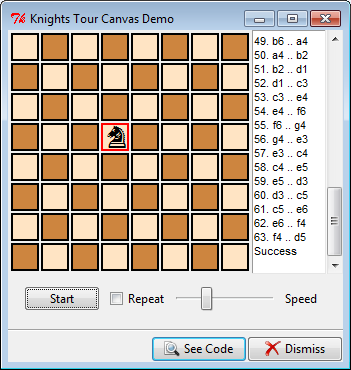
This code is based on the Tcl knightstour.tcl demo written by Pat Thoyts. The demo uses a Canvas widget (to display a chessboard), a Text widget, a Button, CheckboxButton, and Scale (to control the tour).
Initially, a chessboard is displayed with a single chess piece, a black knight, who may be dragged to another square. Below the board are three controls: a Start button, a Repeat checkbox and a Speed scale. Pressing Start begins the tour which is calculated using an enhanced Warnsdorff's rule (see the original tcl file for more info). As the knight begins to move around the board, the position changes are recorded in the text widget to the right of the board. Drag the scale to change the speed with which the knight is moved. Click the Repeat checkbox to run random tours continuously.
Note that the knight will disappear if dragged off the board; hit Start to have him repositioned.


Initially, a chessboard is displayed with a single chess piece, a black knight, who may be dragged to another square. Below the board are three controls: a Start button, a Repeat checkbox and a Speed scale. Pressing Start begins the tour which is calculated using an enhanced Warnsdorff's rule (see the original tcl file for more info). As the knight begins to move around the board, the position changes are recorded in the text widget to the right of the board. Drag the scale to change the speed with which the knight is moved. Click the Repeat checkbox to run random tours continuously.
Note that the knight will disappear if dragged off the board; hit Start to have him repositioned.

Wednesday, August 8, 2012
Tkinter Simple Plot
This code is based the Tcl plot.tcl demo. It uses Canvas to create a simple plot. The data points can be dragged to new positions; the currently selected data point's fill colour is changed to red.


Wednesday, July 25, 2012
Tkinter Image Viewer Demo
This code is based on the Tcl image2.tcl. I've made a few minor changes to the original; used PIL for the image handling and added a filetype filter to limit the types of files that will appear in the Files listbox.


Monday, July 23, 2012
Tkinter 15 Puzzle Demo (Placer Geometry Manager)
This code is based on the Tcl puzzle.tcl demo which creates a square with 15 numbered buttons and an empty space which allows the numbers to be moved around one at a time; the goal being to get all the button tiles into proper numerical order.
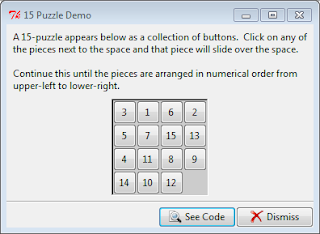
It's actually a pretty good demonstration of the Placer Geometry Manager which allows widgets to be precisely placed relative to the top, left corner of their containing, or ancestor, frame.

It's actually a pretty good demonstration of the Placer Geometry Manager which allows widgets to be precisely placed relative to the top, left corner of their containing, or ancestor, frame.
Subscribe to:
Posts (Atom)